Forum Discussion

The term '...' is not recognized as the name of a cmdlet
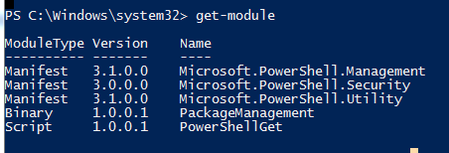
- May 24, 2020
OK, please try the following commands in PowerShell;
Install-Module MSOnline
then,
Import-Module MSOnline
then try to connect to the MS Online service by entering;
Connect-MsolService
You should be prompted now for your M365 Global Admin credentials. Login and you can run the Get-MsolUser commands.
In order to execute the Get-ADUser commands, try running Import-Module activedirectory

OK, could be a TLS problem. Try also running this command;
Net.ServicePointManager]::SecurityProtocol = "tls12"

- Andres-BohrenNov 01, 2023Steel ContributorYou should set the TLS 1.2 Registry Keys
https://blog.icewolf.ch/archive/2020/12/03/admins-setzt-endlich-die-tls-1-2-eintrage-fur-dotnetpowershell/
This is just a temporary workaround
[System.Net.ServicePointManager]::SecurityProtocol = "tls12"
And you need to Run PowerShell as Administrator to install the Module
https://blog.icewolf.ch/archive/2023/10/29/powershell-module-microsoft-online-sharepoint-powershell-16-0-24211-12000/
Or use the Scope Parameter
Install-Module MSOnline -Scope CurrentUser
Regards
Andres - LainRobertsonOct 29, 2023Silver Contributor
The library reference is incorrect.
It should be:
[System.Net.ServicePointManager]::SecurityProtocol
Not:
[Net.ServicePointManager]::SecurityProtocol
Cheers,
Lain
 hritwizaguptaOct 29, 2023Copper Contributor
hey i got the error after this command,
[Net.ServicePointManager]::SecurityProtocol = "tls12"
 soksonjrJul 23, 2022Copper Contributor
Hi, I'm new to powershell and I'm trying to run this command 'Get-NetDomain" but it's returning this error:
"Get-NetDomain : The term 'Get-NetDomain' is not recognized as the name of a cmdlet, function, script file, or operable program. Check the spelling of the name, or if a path was included, verify that the path is correct and try again.
At line:1 char:1
+ Get-NetDomain
+ ~~~~~~~~~~~~~
+ CategoryInfo : ObjectNotFound: (Get-NetDomain:String) [], CommandNotFoundException
+ FullyQualifiedErrorId : CommandNotFoundException"Any idea how I can fix that?
- clleeMay 27, 2020Brass Contributor
PeterRising
Thanks. Appreciate your help. - PeterRisingMay 24, 2020MVP
Glad you have got it to work. To answer your question, the commands you have listed here connect you to Exchange Online PowerShell as opposed to connecting to MSOnline. Exchange Online PowerShell will allow you to manage mailboxes and groups and connectors (all things mail really), whereas the MSOnline service allows you to manage User Objects, Licences, etc etc.
- clleeMay 24, 2020Brass Contributor
It works! Thanks. I realized it needs to be run on a 64bit PS.
Also I noticed certain commands we need to first connect to the O365 by:
$UserCredential = Get-Credential
$Session = New-PSSession -ConfigurationName Microsoft.Exchange -ConnectionUri https://outlook.office365.com/powershell-liveid/ -Credential $UserCredential -Authentication Basic -AllowRedirection
Import-PSSession $Session
But in the steps you provided, we don't have to? What is the difference?
Thanks. - PeterRisingMay 24, 2020MVP
Sorry, I missed a bracket at the start. Try again please with correct command.
[Net.ServicePointManager]::SecurityProtocol = "tls12"

