Forum Discussion

Dmitry_Popov
May 05, 2020Copper Contributor
The strange behavior of PowerShell script in disconnected session
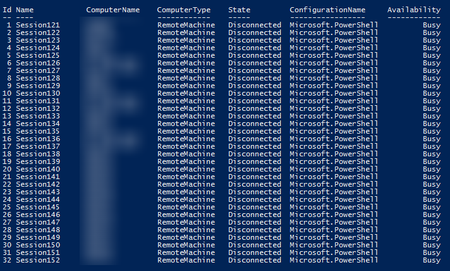
Hello! Could you please explain the strange behavior of PowerShell script in disconnected session? During execution of following script PowerShell console hangs after first 32 items been processed ...

Mike Shivtorov
May 08, 2020Copper Contributor
Dmitry_Popov
Just use "ThrottleLimit" parameter to specify the maximum number of concurrent connections. Its default value is 32.
For example, 100 connections at a time:
Invoke-Command -ComputerName $computers -InDisconnectedSession -ThrottleLimit 100 -ScriptBlock { hostname }
Don't make too many concurrent connections.
In your latest comment you use "-ThrottleLimit $computers.Count" - it might be too high depending on number of computers in your domain. I guess a hundred or two of concurrent sessions should be more than enough.
Get-Help Invoke-Command -Parameter ThrottleLimit

Dmitry_Popov
May 08, 2020Copper Contributor
I understand this, therefore, I asked a question. Earlier, I tried using a parameter ThrottleLimit and concurrent connection. But this led to the hang and the status of the busy.
for example
$computer = (Get-ADComputer -filter *).name | select -First 100
Invoke-Command -ComputerName $computer -ThrottleLimit 40 -ScriptBlock {$env:COMPUTERNAME} -InDisconnectedSession
Now in work I use this option
$computers = (Get-ADComputer -Filter *).name | select -First 400
$session = foreach ($item in $computers)
{
	Invoke-Command -ComputerName $item -InDisconnectedSession -ScriptBlock {
            $out = $env:COMPUTERNAME
            Start-Sleep -Seconds 10
            return $out
	}
}