Forum Discussion

The strange behavior of PowerShell script in disconnected session
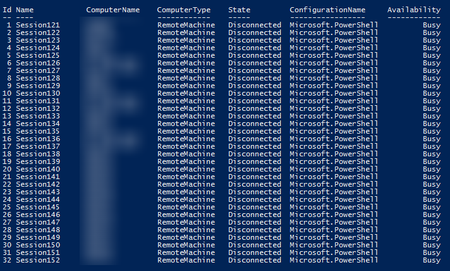

Surely you can use invoke-command on more than 32 computers.
Look at example 7 and 18 on https://docs.microsoft.com/en-us/powershell/module/microsoft.powershell.core/invoke-command?view=powershell-7
 Dmitry_PopovMay 06, 2020Copper Contributor
Example 7 without the inDisconnectedSession parameter.
Example 18 hangs with busy status if the number of computers is more than 32.
I found two working crutches for myself, but I would like to understand why it does not work as expected.Crutch 1
$computers = (Get-ADComputer -Filter *).name | select -First 35
Invoke-Command -ComputerName $computers -InDisconnectedSession -ThrottleLimit $computers.Count -ScriptBlock {
            $out = $env:COMPUTERNAME
            Start-Sleep -Seconds 10
            return $out
}
Crutch 2
$computers = (Get-ADComputer -Filter *).name | select -First 35 foreach ($item in $computers) { Invoke-Command -ComputerName $item -InDisconnectedSession -ScriptBlock { $out = $env:COMPUTERNAME Start-Sleep -Seconds 10 return $out } } Mike ShivtorovMay 08, 2020Tin Contributor
Dmitry_Popov
Just use "ThrottleLimit" parameter to specify the maximum number of concurrent connections. Its default value is 32.For example, 100 connections at a time:
Invoke-Command -ComputerName $computers -InDisconnectedSession -ThrottleLimit 100 -ScriptBlock { hostname }Don't make too many concurrent connections.
In your latest comment you use "-ThrottleLimit $computers.Count" - it might be too high depending on number of computers in your domain. I guess a hundred or two of concurrent sessions should be more than enough.
Get-Help Invoke-Command -Parameter ThrottleLimit- Dmitry_PopovMay 08, 2020Copper Contributor
I understand this, therefore, I asked a question. Earlier, I tried using a parameter ThrottleLimit and concurrent connection. But this led to the hang and the status of the busy.
for example$computer = (Get-ADComputer -filter *).name | select -First 100 Invoke-Command -ComputerName $computer -ThrottleLimit 40 -ScriptBlock {$env:COMPUTERNAME} -InDisconnectedSessionNow in work I use this option
$computers = (Get-ADComputer -Filter *).name | select -First 400
$session = foreach ($item in $computers)
{
	Invoke-Command -ComputerName $item -InDisconnectedSession -ScriptBlock {
            $out = $env:COMPUTERNAME
            Start-Sleep -Seconds 10
            return $out
	}
}