Forum Discussion

Shehzad
Oct 01, 2023Copper Contributor
strange behavior when selecting multiple values in GridView
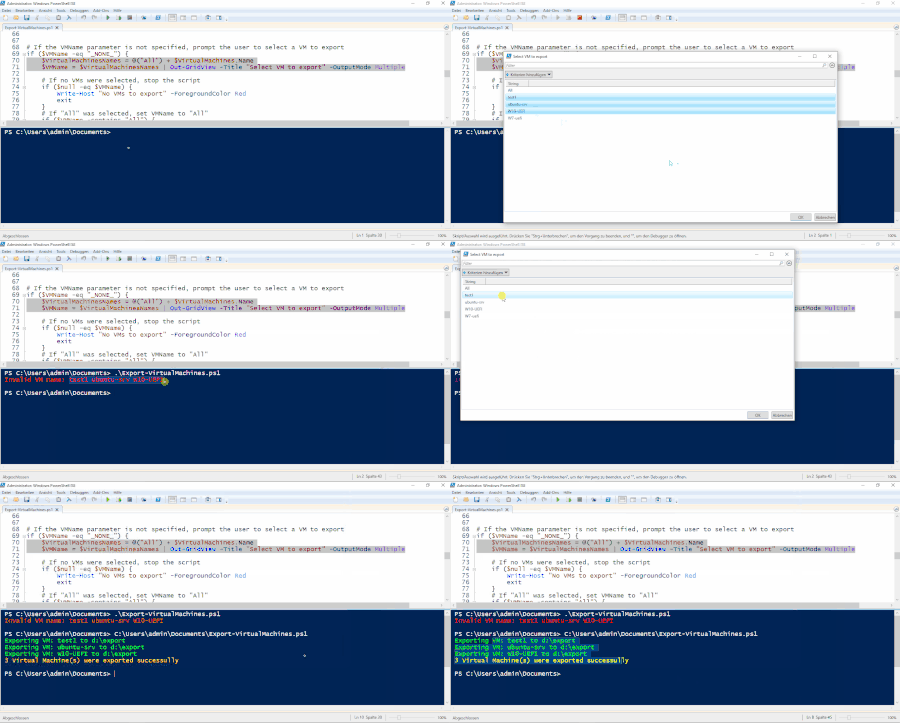
I was writing a script to export Hyper-V VM, the script is basically meant to be run from CLI or scheduled-tasks. but I like to make my script also able to be used interactively. In Scre...

Oct 02, 2023
You don't need to have Hyper-V installed on the machine, and you need to have the management tools installed. You can do that by running: Enable-WindowsOptionalFeature -Online -FeatureName Microsoft-Hyper-V-Management-PowerShell -NoRestart:$true
Afterwards, the Get-VM cmdlet should work, and you can use the -ComputerName parameter to specify a remote host.
Afterwards, the Get-VM cmdlet should work, and you can use the -ComputerName parameter to specify a remote host.

Shehzad
Oct 02, 2023Copper Contributor
You are right that the script can only be executed on a Hyper-V Host (or remoting into Hyper-V host) and that's exactly what I am doing, I am runningit on Hyper-V Host. I have no issues with the command Get-VM, it is giving me a list of VM-Objects and I am extracting the names using (Get-VM).Name
- LainRobertsonOct 02, 2023Silver Contributor
I still cannot make Out-GridView do what you suspect it of doing - which is actually a good thing, so I've taken a look at your script and provided an alternative below.
It's not identical but similar and maybe gives you some ideas for your own script.
The version I'd dropped below:
- Can work locally on a hypervisor or remotely (so long as you have the Hyper-V tools components installed);
- Leverages the fact that the -Name parameter from the native Export-VM command is actually a string array type, not just a string (so I've skipped the per virtual machine looping altogether, which is more efficient).
Anyhow, it's just something else to review given I can't find any issues at all with Out-GridView.
[CmdletBinding()]
Param (
  [Parameter()][string[]] $VMName           # Name of the VM to export
  , [Parameter()][string] $Path = "D:\Data\Temp\Forum\Export"       # Path to export VM to
  , [Parameter()][switch] $AppendDate       # Whether to append datetime to export path
  , [Parameter()][string] $ComputerName     # The hypervisor you want to connect to
)

function Export-VirtualMachine
{
    Param (
        [Parameter(Mandatory=$true)][ValidateNotNullOrEmpty()][string[]] $Name  # Name of the VM to export
        , [Parameter()][string] $Path = "D:\Export"                             # Path to export VM to
        , [Parameter()][string] $ComputerName                                   # The hypervisor you want to connect to
    )

    try
    {
        if ([string]::IsNullOrWhiteSpace($ComputerName))
        {
            Export-VM -Name $Name -Path $Path;
        }
        else
        {
            Export-VM -ComputerName $ComputerName -Name $Name -Path $Path;
        }
    }
    catch
    {
        throw;
    }
}

#region Set up some variables.
$Err_NoMachines = "No virtual machine names found. Aborting."
$Timestamp = [datetime]::Now.ToString("yyyyMMdd-HHmmss");
$Names = [System.Collections.Generic.List[string]]::new();
#region

try
{
    #region Validate the parameters.
    if ([string]::IsNullOrWhiteSpace($Path))
    {
        # We'd only be in here if someone deliberately passed "-Path $null" into the script. Unlikely but possible.
        throw "-Path cannot be null.";
    }

    if ($AppendDate.IsPresent)
    {
        if ($Path.EndsWith("\"))
        {
            $Path = $Path.Substring(0, $Path.Length-1);
        }

        $Path += "-$Timestamp";
    }

    foreach ($Entry in $VMName)
    {
        if (-not [string]::IsNullOrWhiteSpace($Entry))
        {
            $Names.Add($Entry);
        }
    }
    #endregion

    if ($Names.Count -gt 0)
    {
        # Being in this block means we have names passed in from the calling process. We get to play dumb here as it's up to the caller to have ensured the $VMName and $ComputerName parameters are correct.

        Export-VirtualMachine -ComputerName $ComputerName -Path $Path -Name $VMName -ErrorAction:Stop;
    }
    else
    {
        # Being in this block means no names were passed in from the calling process.

        #region Fetch the virtual machine names from the nominated $ComputerName (or local host if $ComputerName is empty). Note: We're not splitting on commas as it's one name per line, not a character-separated single line.
        $AllNames = [System.Collections.Generic.List[string]]::new();

        if (-not [string]::IsNullOrWhiteSpace($ComputerName))
        {
            (Get-VM -ComputerName $ComputerName -ErrorAction:Stop).Name |
                ForEach-Object {
                    $AllNames.Add($_);
                };
        }
        else
        {
            (Get-VM -ErrorAction:Stop).Name |
                ForEach-Object {
                    $AllNames.Add($_);
                };
        }

        if (0 -eq $AllNames.Count)
        {
            Write-Warning -Message $Err_NoMachines;
            return;
        }

        $AllNames.Sort();
        $AllNames.Insert(0, "All");     # Cram a value of "All" at the start.

        # Prompt the user to choose.
        $Names = [string[]] ($AllNames | Out-GridView -OutputMode Multiple);    # Notice here that we're forcing a typecast of a string array ([string[]]). This avoids unwieldly "if..else" checking.

        if (0 -eq $Names.Count)
        {
            Write-Warning -Message $Err_NoMachines;
            return;
        }
        elseif ($Names.Contains("All"))
        {
            $AllNames.RemoveAt(0);
            $Names = $AllNames;
        }
        #endregion

        if (-not [string]::IsNullOrWhiteSpace(($NewPath = (Read-Host -Prompt "Enter an export path or leave empty to use the default ($Path)"))))
        {
            $Path = $NewPath;
        }

        Export-VirtualMachine -ComputerName $ComputerName -Path $Path -Name $Names -ErrorAction:Stop;
    }
}
catch
{
    # We could perform some other actions here, but for this example, we're just going to re-throw the exception up to the caller and let them worry about it.
    throw;
}
Edit #1: To include the "All" option handling (which I'd missed in the original.)
Edit #2: Correction on line 61 where I'd missed "-not".
Cheers,
Lain
