Forum Discussion

strange behavior when selecting multiple values in GridView
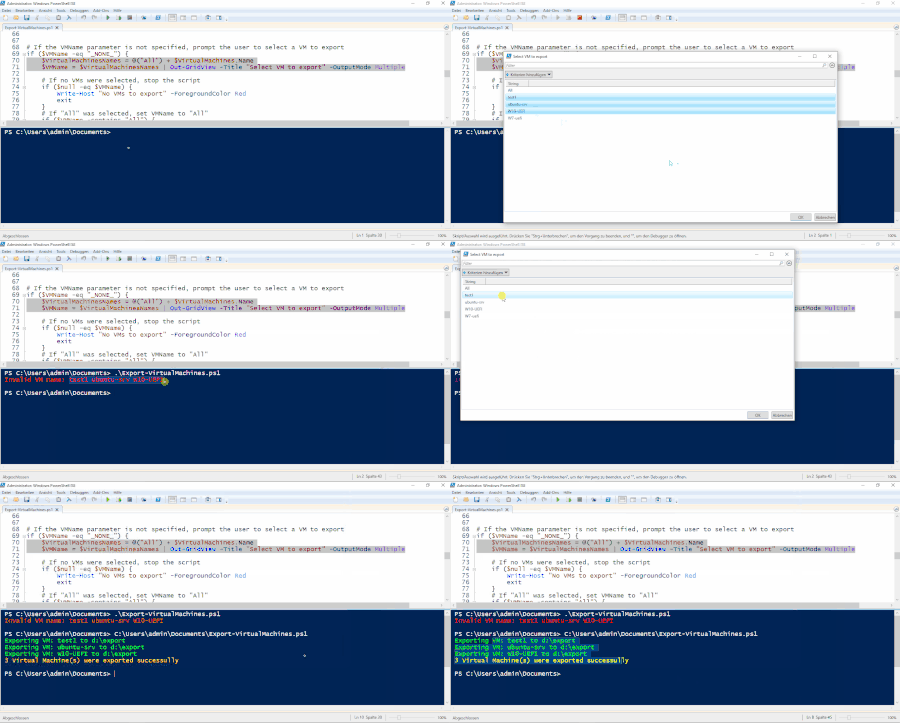

Are you able to post the code down to and including the remote call to the hypervisor?
Also, which version of PowerShell are you running within the ISE session? (Type $PSVersionTable in the blue section.)
I can't reproduce the behaviour of Output-GridView producing a string when multiple list values have been selected.
Cheers,
Lain
 ShehzadOct 02, 2023Copper Contributor
Thanks for the response, sure, here is the link to complete code on github: https://github.com/fahidsh/hyper-v-exporter/blob/main/vm-exporter.ps1
But I think it has to run on a Computer where Hyper-V is installed and probably has a few VMs (can be dummy/empty ones), since it uses the Get-VM command to get the VMs configured.
the way I am building my array for the GridView is through Get-VM, in the code
# Get All Virtual Machines on the Hyper-V Host
$VirtualMachines = Get-VM

# Add 'All' to the start of array of VM Names
$VirtualMachinesNames = @("All") + $VirtualMachines.Name

# Display the list in Grid
$VMName = $VirtualMachinesNames | Out-GridView -Title "Select VM to export" -OutputMode Multiple

# Print the Selected VM Names
foreach($vm in $VMName){
  Write-Host $vm
}

# Print the number of elements selected
Write-Host $VMName.Count
I know if use a static list, it works fine, i.e.
# a static list/array $VirtualMachines = @("VM1", "VM2", "VM3", "VM4") # Add 'All' to the start of array of VM Names $VirtualMachinesNames = @("All") + $VirtualMachines # Display the list in Grid $VMName = $VirtualMachinesNames | Out-GridView -Title "Select VM to export" -OutputMode Multiple # Print the Selected VM Names foreach($vm in $VMName){ Write-Host $vm } # Print the number of elements selected Write-Host $VMName.Count- LainRobertsonOct 02, 2023Silver Contributor
Actually, let me add some context to what I just said.
I tested using the script you posted in here rather than the full script from git, which I read just now and can see has other issues, not the least of which is the if statement splitting on commas, since that can cause issues given a comma can be part of a virtual machine name as shown below.
If you're using the script from git as-is, then I can have a proper read, but at this stage, it's either a very unique issue local to your computer; an oddity with PowerShell (as distinct from Windows PowerShell); or an issue with something else in the git script (likely that cumbersome if block). My feeling is it's most likely to be the latter.
Conversely, if your script is different to the one on git, we'd probably need to see it to learn more.
Cheers,
Lain
- ShehzadOct 02, 2023Copper Contributor
yes you are right about splitting from Comman, it was either to be semi-colons or comman, but since there are rarely commas in VM-Names, especially in the case where I wanted to use the script. So I went with commas.
The script on github is my script, I have posted it this morning myself
- Oct 02, 2023If I read the script, it does seem like something you would run on the host containing the VMs, and it has a local path for exporting the VMs. You might be able to change that to a UNC (\\server\share) path, but not sure if that will work
- LainRobertsonOct 02, 2023Silver Contributor
That git script is basic but fine and doesn't explain the behaviour you're seeing.
Can you run the following command within the ISE session (blue) window and let us know what the output is?
$PSVersionTable
Additionally, if you run that git script using F5 and then also as a command from within the session window, does the same issue occur?
I've run it the following three ways from within Windows PowerShell (aka version 5.1) and cannot get Out-GridView to behave the way you're suggesting it is:
- Within ISE using F5;
- Within ISE as a command directly within the session panel;
- From a PowerShell prompt.
Cheers,
Lain
- ShehzadOct 02, 2023Copper Contributor
Output of $PSVersionTable
$PSVersionTable

# Output
--------------------------------------------------
Name                           Value
----                           -----
PSVersion                      5.1.19041.3031
PSEdition                      Desktop
PSCompatibleVersions           {1.0, 2.0, 3.0, 4.0...}
BuildVersion                   10.0.19041.3031
CLRVersion                     4.0.30319.42000
WSManStackVersion              3.0
PSRemotingProtocolVersion      2.3
SerializationVersion           1.1.0.1
I also thought that maybe ISE is using a different Version of Powershell, but $PSVersionTable return the same output no matter how it is run:
- from a script file opened in ISE (Within ISE using F5)
- in the Terminal Windows within ISE (Within ISE as a command directly within the session panel)
- from normal PS Terminal Window
- executed as a script in normal PS Terminal Window
also for my script, it only produces the desired behavior when run from ISE with F5 or pressing the Run button (Within ISE using F5). The rest of three ways produce the above mentioned strange behavior
- in the Terminal Windows within ISE (Within ISE as a command directly within the session panel)
- from normal PS Terminal Window (From a PowerShell prompt)
- executed as a script in normal PS Terminal Window
