Forum Discussion

VidRocksKay
Aug 31, 2022Copper Contributor
Rename folders based on a column in a CSV file using PowerSehll
Hi Everyone, I'm a beginner to PowerShell. I have a scenario where I need to rename a large amount of folders (see below) in to a new name based on a column value in CSV. Current folders na...
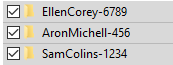
- Aug 31, 2022
You can use this code to fix it
$csv=Import-Csv -Path C:\boot\Book3.csv
Foreach ($Name in $csv){
    try {
        $Filter=$Name.SamAccount.Replace('.','') +'*'
        Get-ChildItem -Directory -Path C:\boot -Filter $Filter | Rename-Item -NewName $name.SamAccount
    }
    catch {
        $_.Exception.Message
    }


}
replace the Path and you are good to go

farismalaeb
Aug 31, 2022Steel Contributor
as I can see, the folder name is UserName with no dot with a number
and the names in the CVS are usernames with a dot in the middle
are all the names following the same naming convention.?
 VidRocksKayAug 31, 2022Copper Contributorfarismalaeb
Thanks for your response. Yes the naming convention is consistently the same. I basically want "FirstLast-123" to be renamed to "First.Last".- farismalaebAug 31, 2022Steel Contributor
You can use this code to fix it
$csv=Import-Csv -Path C:\boot\Book3.csv
Foreach ($Name in $csv){
    try {
        $Filter=$Name.SamAccount.Replace('.','') +'*'
        Get-ChildItem -Directory -Path C:\boot -Filter $Filter | Rename-Item -NewName $name.SamAccount
    }
    catch {
        $_.Exception.Message
    }


}
replace the Path and you are good to go
- VidRocksKaySep 01, 2022Copper Contributor
farismalaeb
This worked like charm! Thanks so much for your prompt response and support to the community !
Just to improve it a bit for everyone's benefit, could we add a line to handle duplicate ? (for instance, if the same name found in the folders, set "2 or 3" at the end).
like - JonDoe-123 , JonDoe-456
Renamed as JonDoe, JonDoe2
Again, thanks very much !