Forum Discussion

sachin011390
Sep 06, 2021Copper Contributor
Manage M365 MFA setting using Powershell
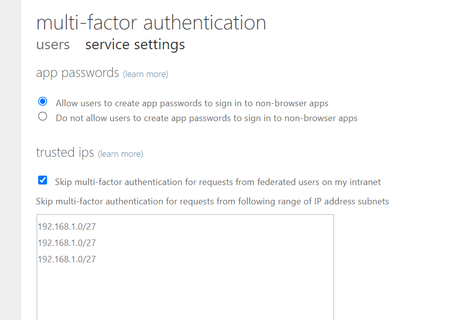
I am enforcing Multi-Factor Authentication for all my M365 users (azure ad plan 2) and it works as expected. Ability to set exceptions when users work from particular branch offices too works as expe...

pvanberlo
Sep 06, 2021MCT
sachin011390 I understand what you're saying, however, Microsoft actually recommends using Azure AD Conditional Access for MFA purposes nowadays. I do not believe there is a programmatic or PowerShell way to change the "trusted IPs for per user MFA" and the portal is the only way to manage this interactively.

MikeCrowley
Sep 25, 2021Iron Contributor
Trusted IPs all come over to conditional access as the "mfa trusted ips" named location. you can interact with named locations.
e.g.
New-MgIdentityConditionalAccessNamedLocation
https://docs.microsoft.com/en-us/powershell/module/microsoft.graph.identity.signins/new-mgidentityconditionalaccessnamedlocation?view=graph-powershell-beta
e.g.
New-MgIdentityConditionalAccessNamedLocation
https://docs.microsoft.com/en-us/powershell/module/microsoft.graph.identity.signins/new-mgidentityconditionalaccessnamedlocation?view=graph-powershell-beta