Forum Discussion

AzharRahman
Oct 18, 2024Copper Contributor
PowerShell ISE slow after launch
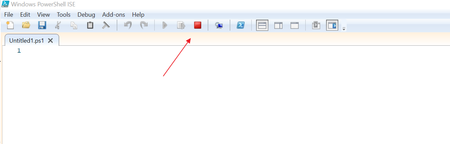
Hi, I have an issue with PowerShell ISE on windows 10 OS, after I launch ISE its take 10 minutes to give options for run script, till then i see only stop operation button. Please help me fix th...

AzharRahman
Oct 19, 2024Copper Contributor
Vern_Anderson thanks for your response.
From PowerShell below are the paths missing the profile.ps1 and Microsoft.PowerShell_profile.ps1
PS C:\WINDOWS\system32> $PROFILE.AllUsersAllHosts
C:\Windows\System32\WindowsPowerShell\v1.0\profile.ps1
PS C:\WINDOWS\system32> $PROFILE.AllUsersCurrentHost
C:\Windows\System32\WindowsPowerShell\v1.0\Microsoft.PowerShell_profile.ps1
PS C:\WINDOWS\system32> $PROFILE.CurrentUserAllHosts
C:\Users\azhar\Documents\WindowsPowerShell\profile.ps1
This command also takes same amount of time.
Start-Process powershell_ise -ArgumentList -NoProfile
I have attached the list of modules installed.

VernAnderson
Oct 19, 2024Copper Contributor
I don't see any modules that jump out at me as unusual, in your modules txt file.
Where the profile path does exist, I would open up those PS1 files and see what is in the profile that might be slowing it down. Sorry I don't have any further ideas at the moment.
Where the profile path does exist, I would open up those PS1 files and see what is in the profile that might be slowing it down. Sorry I don't have any further ideas at the moment.