Forum Discussion

PowerShell ISE slow after launch
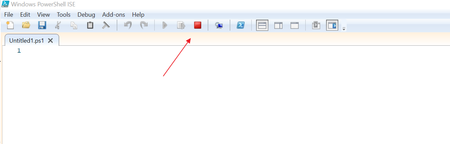

How many third party modules do you have installed?
What do all of your PowerShell profiles contain?
$PROFILE
$PROFILE.AllUsersAllHosts
$PROFILE.AllUsersCurrentHost
$PROFILE.CurrentUserAllHosts
$PROFILE.CurrentUserCurrentHost
The output of each of these will show you the file path to check
1. Does the file by that name exist in the path?
2. If yes what's inside?
The contents of those files and or how many modules you have can affect how long it takes to load ISE or how long it takes for the red square to stop running.
Start-Process powershell_ise -ArgumentList -NoProfile
How long does it take to load when you run that command?

Vern_Anderson thanks for your response.
From PowerShell below are the paths missing the profile.ps1 and Microsoft.PowerShell_profile.ps1
PS C:\WINDOWS\system32> $PROFILE.AllUsersAllHosts
C:\Windows\System32\WindowsPowerShell\v1.0\profile.ps1
PS C:\WINDOWS\system32> $PROFILE.AllUsersCurrentHost
C:\Windows\System32\WindowsPowerShell\v1.0\Microsoft.PowerShell_profile.ps1
PS C:\WINDOWS\system32> $PROFILE.CurrentUserAllHosts
C:\Users\azhar\Documents\WindowsPowerShell\profile.ps1
This command also takes same amount of time.
Start-Process powershell_ise -ArgumentList -NoProfile
I have attached the list of modules installed.
- VernAndersonOct 19, 2024Copper ContributorI don't see any modules that jump out at me as unusual, in your modules txt file.
Where the profile path does exist, I would open up those PS1 files and see what is in the profile that might be slowing it down. Sorry I don't have any further ideas at the moment.
