Forum Discussion

Map network drive


Anytime! Hopefully that's the only change needed and you can get on with more interesting things!
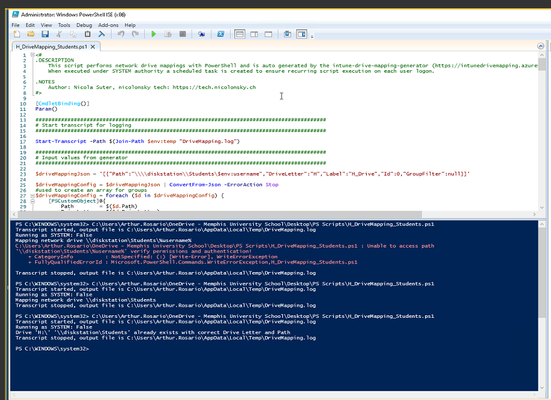
If it doesn't work though, then here's the various lines from the generated script that relate to the drive mapping part (i.e. without all the group checking business, etc.)
If you have access to a client's computer with them logged on, you can copy-and-paste this directly into a normal PowerShell session (i.e. no need to be an admin) and it should work, or at least provide an easy way to track the latest error.
$driveMappingJson = '[{"Path":"\\\\diskstation.musowls.org\\Students\\$env:username","DriveLetter":"H","Label":"H_Drive","Id":1,"GroupFilter":null}]'
$driveMappingConfig = $driveMappingJson | ConvertFrom-Json -ErrorAction Stop
#used to create an array for groups
$driveMappingConfig = foreach ($d in $driveMappingConfig) {
    [PSCustomObject]@{
        Path = $($d.Path)
        DriveLetter = $($d.DriveLetter)
        Label = $($d.Label)
        Id = $($d.Id)
        GroupFilter = $($d.GroupFilter -split ",")
    }
}
foreach ($drive in $driveMappingConfig)
{
    $drive.Path = $ExecutionContext.InvokeCommand.ExpandString($drive.Path)
    $null = New-PSDrive -PSProvider FileSystem -Name $drive.DriveLetter -Root $drive.Path -Description $drive.Label -Persist -Scope global -EA Stop
}
Running this on my computer produced the expected path of "\\diskstation.musowls.org\Students\lain.robertson", where clearly it's my username at the end. So, if this path is what you expect to see, you should be up and running.
Cheers,
Lain
- arturorosarioMar 30, 2022Copper ContributorThank you again. Much too kind. I'll try this if the currently deployed script fails. I prefer the one you sent as it is much cleaner.