Forum Discussion

arturorosario
Mar 09, 2022Copper Contributor
Map network drive
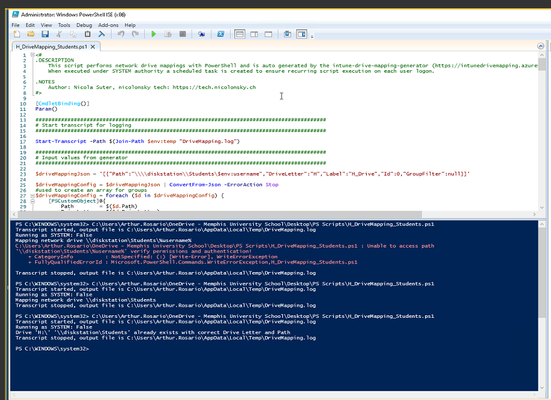
How can I map an internal network share as a user home folder with Azure AD joined PCs? This is what I'm trying to do: H Drive \\server\students\%username% Any help would be most app...

arturorosario
Mar 14, 2022Copper Contributor
%username% is a variable used in local AD to access that current users home drive. It an attempt to explain what I'm trying to accomplish in Azure

Mar 14, 2022
Ok, I was thinking that you tried that too for connecting the home directory from Azure AD joined machines.. You have to use FQDN, \\server.domain.local\sharename for that. Was just thinking, can't you use a mapping to the home share itself without the username behind it? The user will see only his own directory if you use access based enumeration
- Mar 30, 2022
arturorosario But it can still work like that 🙂 You do have access, a user on a workstation can open the share just by typing the UNC path without supplying credentials?
- arturorosarioMar 29, 2022Copper ContributorNothing I do works. This used to be so easy with domain joined machines.
- Mar 29, 2022Did you manage to fix your issue?
- arturorosarioMar 14, 2022Copper ContributorI'll try that when we get back from pring break on Monday. Thanks for sticking with me this far. 😁