Forum Discussion

gorajski_r
Jun 10, 2021Copper Contributor
How to add a trusted site to web options in Windows 10
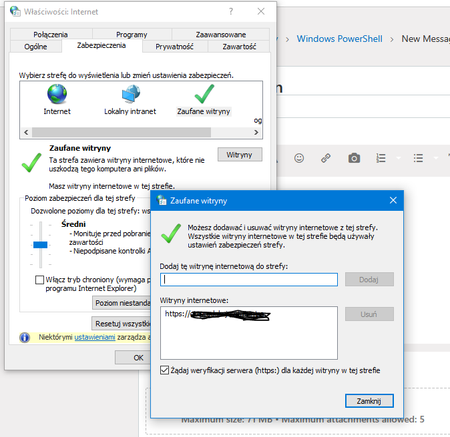
Hello. This is my first post on the forum, so let me introduce yourself. My name is Robert Gorajski and welcome everyone. My first post applies to the possibility of adding a trusted site in net...

gorajski_r
Jun 10, 2021Copper Contributor
OK partly I will answer myself, although I still do not know how to solve the problem to the end.
I sought by the record is in the case of my test computer in the key:
\HKEY_USERS\S-1-5-21-3419930908-1354286565-637230989-88540\SOFTWARE\Microsoft\Windows\CurrentVersion\Internet Settings\ZoneMap\Domains
I see the key in regedit, unfortunately I do not see him in PowerShell
Get-ChildItem HKU:\ | Select-Object Name
Get-ChildItem : Cannot find drive. A drive with the name 'HKU' does not exist.
At line:1 char:1
+ Get-ChildItem HKU:\ | Select-Object Name
+ ~~~~~~~~~~~~~~~~~~~
    + CategoryInfo          : ObjectNotFound: (HKU:String) [Get-ChildItem], DriveNotFoundException
    + FullyQualifiedErrorId : DriveNotFound,Microsoft.PowerShell.Commands.GetChildItemCommand
Does any of you know why?