Forum Discussion

Export a combined (from two different sources) result as a CSV using PowerShell
- Aug 29, 2022
VidRocksKay I changed your script a little bit 🙂
$Import = Import-Csv D:\temp\users.csv -Delimiter ';'
$Total = @()
foreach ($item in $Import) {
    $MS = Get-MsolUser -SearchString $Item.DisplayName

    $msoluser = [PSCustomObject]@{
        'UserPrincipalName' = $MS.UserPrincipalName
        'IsLicensed'        = $MS.IsLicensed
        'BlockCredential'   = $MS.BlockCredential
        'FirstName'         = $MS.FirstName
        'LastName'          = $MS.LastName
        'ArchiveID'         = $item.ArchiveID
        'DisplayName'       = $item.DisplayName
    }
    $Total += $msoluser
}
$Total | Select-Object DisplayName, ArchiveID, UserPrincipalName, IsLicensed, BlockCredential, FirstName, LastName | Export-Csv -NoTypeInformation "D:\Temp\NewOutput.csv" -Delimiter ';' -Encoding UTF8
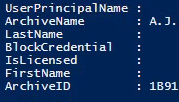
Changed it to a pscustomobject and added every item to a Total variable and saved it to a .csv (Used ; as delimiter, for you it could be a , ) You also had a ArchiveName but I didn't see it in your screenshot, so I removed if for testing but you could add it again 🙂
My users.csv file:Displayname; ArchiveID Alex Wilber;1 Allan Deyoung;2I ran this in my CDX environment for these two users, Excel output:

Harm_Veenstra
Thank you so very much and this worked like charm ! Helped me a lot getting this sorted.
If you happen to spare some time, will you kindly be able to help me with adding another source or two combining to the same script? (i.e. ExchangeOnline/Exchange On-Premise in a Hybrid scenario)
##Exchange Online (Hybrid)-----------------------------
$EXO = Get-EXOMailbox -Identity $item.UserPrincipalName
$exouser = [PSCustomObject]@{
'RecipientTypeDetails' = $EXO.RecipientTypeDetails
'Alias' = $EXO.Alias
#Exchange On-Premise (Hybrid)-----------------
foreach ($item in $Import) {
$EX = Get-Mailbox -Identity $item.UserPrincipalName
'ArchiveStatus' = $EX.ArchiveStatus
'ArchiveState' = $EX.ArchiveState
Thank you heaps again 🙂 !!

- VidRocksKaySep 02, 2022Copper ContributorHi Harm_Veenstra
Yes its the same thing. Just that I wanted to combine all 3 steps in to a single script :). I have posted it as a new question here if you can help out - https://techcommunity.microsoft.com/t5/windows-powershell/generating-a-combined-csv-from-multiple-sources-currently-using/m-p/3615909#M5252
Appreciate it ! Thank you