Forum Discussion

Bulk Update SharePoint Online User Profile Properties with Extension Attributes in Azure AD
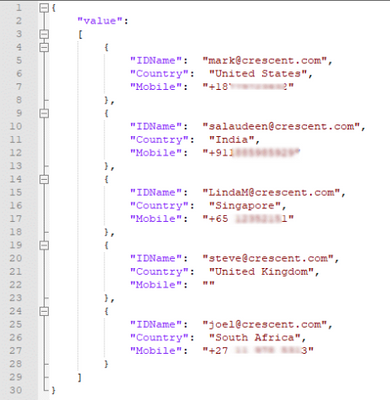

Not sure if the reply is too late, but we had a similar solution where we needed to update some properties that are not synced by default.
We were using Graph API to get all the users from Azure AD and then sync with SharePoint User Profile entries by submitting a JSON file to UPS import job.
In brief we followed the steps:
- Get data from Graph API (with deltas, getting only the updated identities from last sync)
- Create a JSON with all users with new values (User Profile properties vs new values from Azure AD)
- Store JSON file in a document library
- Submit the JSON to UPS by using what is explained here - https://learn.microsoft.com/en-us/sharepoint/dev/solution-guidance/bulk-user-profile-update-api-for-sharepoint-online
The user profile properties that will be updated by the process needs to configured in UPS as non editable by the users (for some specific properties we created new properties in UPS)

 zegJun 02, 2023Copper Contributor
willmx
You could use the following script and keep your last DeltaLink somewhere to check changes on the next run.You might need to add some loop if your users are updated frequently
$nextLink = 'https://graph.microsoft.com/v1.0/users/delta?$select=<property1 that you need to checck>,<property2 that you need to checck>,etc.'
#Run this the first time once /start
while (![string]::IsNullOrEmpty($nextLink)) {
    $res = Invoke-GraphRequest -Uri $nextLink
    $nextLink = $res.('@odata.nextLink')
}
$deltaLink =  $res.('@odata.deltaLink')
Keep your $deltaLink somewhere and
#Run this the first time once /end

repeat the follwoing
#####################################
$res = Invoke-GraphRequest -Uri $deltaLink
$deltaLink =  $res.('@odata.deltaLink')
Check $res.Values for changes
Keep your $deltaLink somewhere
#####################################