Forum Discussion

Issue with authorization access for Teams group member to Stream video
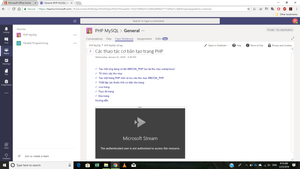

We are having the same issue.
Starting a few days ago at random some users have been unable to see videos or channels on Stream.
Sometimes a user will be unable to see the channel at all and sometimes just a specific video.
I have had some success removing the user from the group, then re-adding them. At least that worked yesterday, now today they've lost access again.

 Microsoft
David Nguyễn - From the screen shot it looks like the users are accessing stream videos that are linked/embedded into a OneNote, and then that OneNote is a tab in Teams. Does it work if the users open up the OneNote directly or is it still the same? Can users go to the linked video directly in Stream does that work? The message says they don't have access, I'm wondering if someone changed the permissions on the video itself?
Jeff Ammons - How are the videos added into Teams in your case? Are they putting the videos in a OneNote which is then a tab in teams like the above example, or are they using the Stream tab direction in teams?
Saili Raje - Can you take a look at this?
- Marc MrozMar 27, 2018
David Nguyễn and Jeff Ammons - Do you happen to know if your groups/teams use "hidden membership"? I just talked with one of our on call engineers and there is an open incident related to Stream not being able to recognize the correct membership of a group when hidden membership is enabled for the group. This just started happening since our last deployment. We are actively working on fixing this issue and getting it deployed as fast as we can but it will likely take a few days or so. As a workaround if a member is upgraded to be an owner of the group Stream works correctly. So sorry for this bug.
- Jeff AmmonsMar 27, 2018Copper Contributor
Hi, Marc Mroz.
I'm not familiar with hidden membership.
In my case I created groups in Teams and added Class Notebooks. Then I create Group Channels in Stream for each group (usually 2-4 channels per group).
Once I publish a lecture video, I paste the link into OneNote.
This has been working great since back in the fall.
Last week I got my first report of a student who couldn't view a video.
I've had spotty success removing users from groups and adding them back. Sometimes that works and sometimes it either doesn't work at all or works temporarily.
In some cases they can see the channel, just not any videos in it.
I've also tried manually adding a student directly to the video itself and sometimes that works.
I will try making them owners next.
I do have a support ticket open #:7707118.
Thanks for your help!
- Marc MrozMar 28, 2018
It seems like your issue is related to the Hidden Membership issue we are looking into to fixing. If your organization uses the SDS service to create Teams/Groups automatically for classes, that tool always sets the membership to hidden.
Update on Fix:
It turns out this issue seems harder to fix/address than we thought originally yesterday. The issue is that we change significantly how we sync group membership into Stream (to help improve scale/performance of syncing) and with this change we introduced this problem. We are in discussions with the AAD team inside MS to try and track down the correct way for us to fix this problem. It will likely take us some time to find the right fix and deploy it. So sorry.
 David NguyễnMar 27, 2018Copper ContributorOne more point is that I'm the owner of that channel and I blocked permission that group members can control my video.
- David NguyễnMar 27, 2018Copper ContributorMarc Mroz - The Class Notebook is a default tab when we create a team as class in MS Teams. And for the case in my picture, it used to work well since a year ago (video playing as an embed directly on page). I found out that the trouble come from Stream access control since the video is posted in a private group. This user also a member of that private group so he can watch the video until last week.