Forum Discussion

Charlie Guo
Aug 09, 2017Former Employee
Embedded Stream video fail to play on SharePoint Online modern page using IE 11
I just uploaded a video clip to Microsoft Streams and it plays fine in IE11. However, when i embed the same stream video on a SharePoint Online modern page , the video fails to play and says the vide...
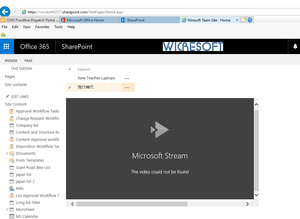
 Aug 16, 2017You will need to add the https://web.microsoftstream.com/ in your trusted sites for it to work in IE.

Aug 10, 2017
How are you embeding the video in your SPO classic pages? Adding Marc Mroz

Charlie Guo
Aug 10, 2017Former Employee
Hi, This is how I embed stream video in classic page:
1. Navigate to the home page of default team site
2. Click the edit button at top left corner
3. Click on the "Insert" Tab, then click "Embedded Code"
4. Navigate to my Stream channel, find the video I want to embed, click Share, then select Embed, and I can get the embed code like <iframe width="640" height="360" src="https://web.microsoftstream.com/embed/video/5e2c3e49-92e4-4825-8ca7-e489f50b6388?autoplay=false" frameborder="0" allowfullscreen ></iframe>
5. Copy and paste embed code to the "Embedded Code" dialog box, click "insert" button
6. Click save button at top left corner
- Aug 11, 2017Well, it sounds good to me so I think it's some kind of limitation with embedding stream videos in classic SPO sites