Forum Discussion

SQL Server installation issues
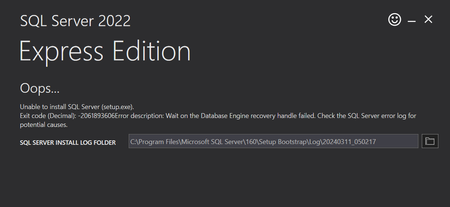

Based on the text in your ERRORLOG, this is the more likely culprit:
https://learn.microsoft.com/en-us/troubleshoot/sql/database-engine/database-file-operations/troubleshoot-os-4kb-disk-sector-size#:~:text=for%20potential%20causes.-,Scenario%20%232%3A,-You%20install%20any
You're attempting to install SQL Server on a drive with a "physical sector size" larger than 4k on a Windows 11 machine, and most likely need to enable emulation of 4k "physical sector size".
You can verify this using the following in command or powershell (administrator)
fsutil fsinfo sectorinfo C
Compare the values PhysicalBytesPerSectorForAtomicity and PhysicalBytesPerSectorForPerformance, and if either of them are larger than 4096, your symptoms would be likely to show up.
Using powershell as administrator, you can add a registry key value pair.
New-ItemProperty -Path "HKLM:\SYSTEM\CurrentControlSet\Services\stornvme\Parameters\Device" -Name "ForcedPhysicalSectorSizeInBytes" -PropertyType MultiString -Force -Value "* 4095"
After a reboot, you should be able to start SQL Server.
Alternatively, you can start SQL Server using traceflag 1800.
This article describes how to add trace flags as startup parameters to SQL Server.
https://www.sqlshack.com/microsoft-sql-server-trace-flags-and-usage-details/#:~:text=Adding%20a%20trace%20flag%20into%20the%20Microsoft%20SQL%20Server%20startup%20parameters

SivertSolem Thank you for your help. I was able to resolve my issues