Forum Discussion

batteb
Feb 02, 2026Copper Contributor
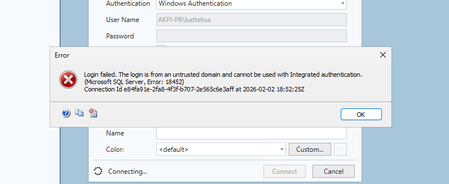
SQL 2022 connect from Windows 2025
Issues connect from another Windows 2025 Server to SQL 2022 Any ideas

carlwalk
Feb 04, 2026Brass Contributor
This issue usually comes down to Windows Server 2025 enforcing stricter defaults for networking and encryption, which can block older SQL configurations. Make sure SQL Server 2022 has TCP/IP enabled, confirm the port is reachable, and install the latest ODBC Driver 18/19 on the Windows 2025 machine. In many cases the connection fails because Windows 2025 requires TLS 1.2 by default, so double‑check that TLS 1.2 is enabled on the SQL Server host and that outdated drivers aren’t being used. Once TCP/IP, firewall rules, TLS settings, and the modern SQL client are aligned, connections from Windows Server 2025 to SQL Server 2022 typically work without further issues.