Forum Discussion

Installing Microsoft SQL 2022-version no longer supported
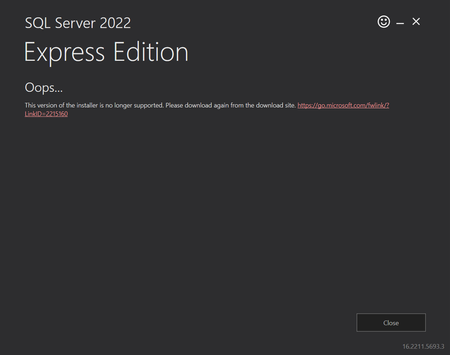

Hi, The message is quite explicit here - the installer version you are using is no longer supported.
I would delete the SQL2022-SSEI-Expr.exe file you already downloaded and download it again using the link shown directly in the error message.
Also, instead of using the default online installation, I would choose Download Media and perform an offline installation from the downloaded media. The default Express installer is essentially a bootstrapper that downloads the required components during setup, so using offline media avoids problems related to an outdated or cached installer.
 BitflingerSep 18, 2026Copper Contributor
Assume you are dealing with a reasonably competent audience.
Please highlight the "Download Media" option, if you would be so kind:
https://www.microsoft.com/en-us/evalcenter/download-sql-server-2022
 PatatorOct 22, 2026Copper Contributor
Hi,
I face the same issue. "SQL2022-SSEI-Eval.exe" return: