Forum Discussion

How to delete backup maintenance plan ( Backup Every 3 Hrs.)
- Mar 15, 2023
Hi oliver076
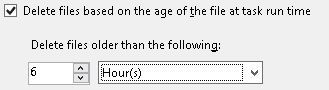
there are multiple ways to delete the old backups files in SQL Server
Check this post for multiple options including the use of the maintenance plan wizard


I think you can do it like this:
1. Open the backup tool or management platform. This may be a backup software, a cloud service provider's console, or a database management system's administration interface.
2. Navigate to the Settings or Configuration section of the backup maintenance plan. Typically, you can find the appropriate settings in the menus or options of the management interface.
3. Locate the current backup maintenance plan and choose to delete or edit it. This may involve selecting a specific backup task or plan and clicking the corresponding Edit or Delete button.
4. If you choose to edit a backup maintenance plan, you will be taken to a screen where you can change the backup frequency and other related settings.
5. In the Backup Frequency or Schedule Interval section, change the backup frequency from Every 3 hours to Every 6 hours. This may involve changing the numbers or selecting a new interval option.
6. Once you have completed the changes, save and apply the new Backup Maintenance Plan settings.
Hope it can help you