Forum Discussion

LV Spencer
Jan 29, 2019Copper Contributor
Skype for Business Server Being Dropped
I will be in the meeting of a training session or phone call and Skype for Business will be dropped. I still have audio but I lose the Skype for Business window. Does anyone know why
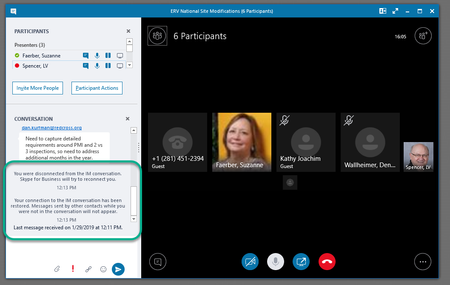

- Jan 29, 2019Might be a problem with the latest update for Skype for Business client.
https://bloguc.com/skype-for-business-meeting-conversation-window-disappear/

LinusCansby
Jan 29, 2019MVP
Sounds like it some problem with your local installation of Skype for Business client, Windows client or local profile since the application window crashed.
First try to delete your Skype profile on your computer. You will find it here. %UserProfile%\AppData\Local\Microsoft\Office\16.0\Lync
If that doesn't help uninstall Office (including Skype) and reinstall Office on your computer.
First try to delete your Skype profile on your computer. You will find it here. %UserProfile%\AppData\Local\Microsoft\Office\16.0\Lync
If that doesn't help uninstall Office (including Skype) and reinstall Office on your computer.
LinusCansby
Jan 29, 2019MVP
Might be a problem with the latest update for Skype for Business client.
https://bloguc.com/skype-for-business-meeting-conversation-window-disappear/
https://bloguc.com/skype-for-business-meeting-conversation-window-disappear/
 LV SpencerJan 29, 2019Copper ContributorThanks Linus. This is the issue I am having. I'm going to use the Skype Web App to host meetings. Hopefully, I won't experience the problem with Skype Web App. I won't use the desktop version until Microsoft comes up with a solution.