Forum Discussion

Understanding the use of the Evidence Role field in Alert Tuning
- Nov 13, 2023
Hi JoshuaN1,
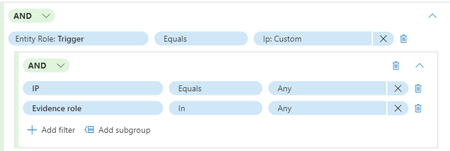
The Evidence Role field in alert tuning is used to specify the role of the evidence in the alert. The options for this field are In and Not In. If you select In, the alert will trigger if the evidence is present. If you select Not In, the alert will trigger if the evidence is not present.
For example, if you want to create an alert that triggers when a certain IP address is involved, you would use the IP filter and set the Evidence Role to In. This means that the alert will trigger if the IP address is present in the evidence.
Investigate alerts in Microsoft 365 Defender | Microsoft LearnPlease click Mark as Best Response & Like if my post helped you to solve your issue.
This will help others to find the correct solution easily. It also closes the item.If the post was useful in other ways, please consider giving it Like.
Kindest regards,
Leon Pavesic
(LinkedIn)

Are you able to give me any information on the effect of the different options Contextual, Impacted, Related?

Hi JoshuaN1,
thanks for the update.
Regarding your question, the Contextual option in the Evidence Role field of Alert Tuning is used to identify the context of the alert. This option is used to identify the context of the alert.
The Impacted option is used to identify the entities that are impacted by the alert.
Finally, the Related option is used to identify the entities that are related to the alert. These options are used to help analysts better understand the scope of the alert and to help them determine the appropriate course of action.
For more information you can check out the following links:
Boost your detection and response workflows with alert tuning (microsoft.com)
Investigate alerts in Microsoft 365 Defender | Microsoft Learn
Please click Mark as Best Response & Like if my post helped you to solve your issue.
This will help others to find the correct solution easily. It also closes the item.
If the post was useful in other ways, please consider giving it Like.
Kindest regards,
Leon Pavesic
(LinkedIn)
- JoshuaN1Nov 13, 2023Copper ContributorAhh cool okay, thank you for the help 🙂
- LeonPavesicNov 13, 2023Silver Contributor