Forum Discussion

Sentinnel Entity Mapping Issue
am writing an analytic rule for sentinel for activity captured on a Windows 10 Pro VM corresponding to a Windows Event ID from Event Viewer. For the entities on the alert rule I have the Host which is the windows 10 VM as well as a field for the account name that initiated the action. However, when the alert fired only the host name appears and not the user account. I used a KQL query to project the account name and the field comes up as empty in the Logs as well. The only place I see the username is when I look at the EventData field in the logs and it is under the SubjectUserName. Is there anyway to utilze categories from the EventData Field in Sentinnel Logs in an analytic rule?
- Yep you will need to use the parse operator to take the field you want out of your EventData
Not exactly sure what EventID you are after (feel free to post an example of the EventData), but an example of parsing EventData is as follows
SecurityEvent
| parse EventData with * '<Data Name="SubjectUserName">' User '</Data>' *
Add that to your query and it will create you a new column called 'User' from everything between <Data Name="SubjectUserName"> and '</Data>' and you can then map it to an entity in your analytic rule.
I did a little guide to using parse and split on my GitHub if you are interested - https://github.com/reprise99/Sentinel-Queries#parse-and-split-basics
5 Replies
 m_zorichIron ContributorYep you will need to use the parse operator to take the field you want out of your EventData
Not exactly sure what EventID you are after (feel free to post an example of the EventData), but an example of parsing EventData is as follows
SecurityEvent
| parse EventData with * '<Data Name="SubjectUserName">' User '</Data>' *
Add that to your query and it will create you a new column called 'User' from everything between <Data Name="SubjectUserName"> and '</Data>' and you can then map it to an entity in your analytic rule.
I did a little guide to using parse and split on my GitHub if you are interested - https://github.com/reprise99/Sentinel-Queries#parse-and-split-basics- SentinnelCMANCopper Contributor
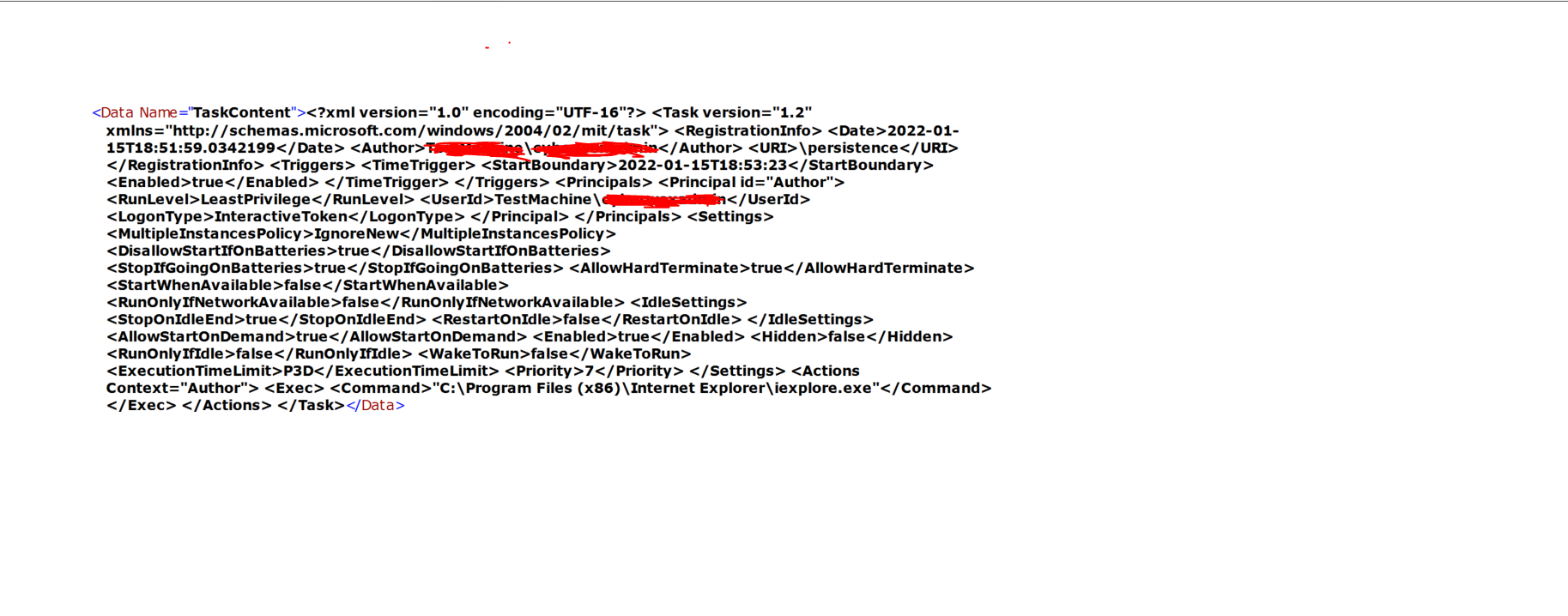
Had a follow up question. Would parse would work on a particular part of an Eventdata field?. For instance in Event data for the query Im writing one of the categories is TaskContent . There is alot of info there but i only want this piece "<Exec> <Command>"C:\Program Files (x86)\Internet Explorer\iexplore.exe" How would set it to only pull this from the TaskContent field and nothing else? I have attached the screenshot of the eventdata.
- m_zorichIron ContributorYep parse will work on that, you can use parse multiple times as well, the key is just telling parse what is at the start and end of the data you are after.
| parse EventData with * 'Command>"' CommandRun '</Command>' *
That will create you new column called CommandRun with everything between Command> and </Command>
- SentinnelCMANCopper ContributorThank you so much! It works!