Forum Discussion

stianhoydal
Sep 09, 2021Brass Contributor
Azure Sentinel triggers incident when it shouldn't
Greetings, I just ran into something interesting. I have created a analytics rule that looks like this: let exceptionUsers = IdentityInfo
| where TimeGenerated > ago(22d) //IdentityInfo refreshe...

stianhoydal
Sep 09, 2021Brass Contributor
I see, that probably explains why the users that should be excluded shows up anyway. Since the IdentityInfo table is only updated every 21 days i seem to be unable to get this information as queries against the table sometimes return empty if the users in question haven't been updates within the timeframe. Seeing as the lookback time you can set in the query wizard is max 14 days i need to figure out a workaround i suppose.
stianhoydal
Sep 10, 2021Brass Contributor
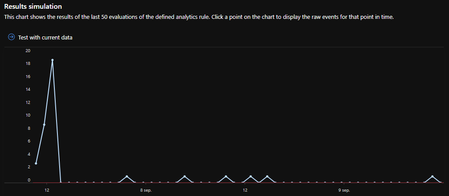
So i figured out a simple workaround, but still the query wizard shows that it would trigger the alarm several times although it shouldn't have.
let excludedUsers = GuestAccountsExcludedFromCAPolicy_CL
| distinct UserEmail_s;
SigninLogs
| where Location !in ( "AL","AD","AM","AT","BY","BE","BA","BG","CH","CY","CZ","DE","DK","EE","ES","FO","FI","FR","GB","GE","GI","GR","HU","HR","IE","IS","IT","LI","LT","LU","LV","MC","MK","MT","NO","NL","PL","PT","RO","RU","SE","SI","SK","SM","TR","UA","VA","SJ","") // List of country codes in europe.
| where UserPrincipalName !in (excludedUsers)
| extend AccountCustomEntity = Identity
| extend IPCustomEntity = IPAddress
The GuestAccountsExcludedFromCAPolicy_CL is simply a table filled with users fetched from AAD via logic apps.
Still the query wizard shows that it would trigged multiple alarms within the last 48 hours although there should only be one.
It seems to me as if the query is just ignoring the line
| where UserPrincipalName !in (excludedUsers)
because it would be correct otherwise, but the whole point is to not get alerted when one of the excluded members tries to log on.
Anyone have any ideas on why this is happening, or potential solutions?
- GaryBusheySep 10, 2021Bronze ContributorIt looks right. I would double check the values you are getting in your custom tables to make sure they are matching what you are seeing in the SigninLogs.
You may also want to use a Watchlist for the locations to make it easier to keep up to date.- stianhoydalSep 14, 2021Brass ContributorFor anyone else that might have been wondering, seemingly the best way i found to make this work is to fetch the AAD group members into a custom table and update this according to how often you would want to run the analytics rule since the analytics rule wizard overrides any time references made in a query. If i want the query to run every 1 hour with the latest 1 hour of data i would need to update the custom table every 1 hour or less.
