Forum Discussion

Microsoft Sentinel - switching simple mode to kql mode in sentinel logs
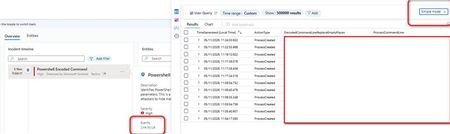

Your screenshots show KQL already selected as the default, while the alert’s Link to LA opens its results in Simple mode. Microsoft documents that default under Log Analytics settings, so repeating the same configuration is not a demonstrated fix. First compare opening Logs directly on the same workspace with opening that specific alert link, using the same signed-in browser session. This distinguishes a preference that is not being retained from behavior specific to the alert navigation. For the immediate investigation, switch the opened results to KQL mode using the top-right dropdown; Microsoft documents that the corresponding query is preserved in the editor for further editing. If only the alert link ignores your preference, report that reproducible path to Azure support with the workspace context, browser version, alert example, and screenshots. I cannot confirm a documented setting that forces every Sentinel alert link to honor the default.