Forum Discussion

Ronak_Shah
Aug 23, 2021Copper Contributor
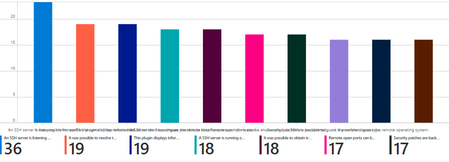
In Azure Workbooks Bar chart x-axis labels are half-displayed or not displayed
Hi, We are working on creating a custom connector to ingest the data in Azure Sentinel. We are now working on workbooks. But in workbooks, in the graphs, we are facing problem, that x-axis labels...

GaryBushey
Aug 26, 2021Bronze Contributor
Ronak_Shah This is more of an issue with the workbook rather than your query. Because you X-axis names are so long they will merge in the Bar chart. The Bar Chart (categorical) only shows the X-axis value that you have the mouse on so that is why it doesn't show all of them.
Unfortunately, there does not appear to be a way to rotate the X-axis text using the plain Bar Chart, nor does the appear to be a way to have all the X-axis text show up all the time in the Bar Chart (categorical).
Is it possible that you could shorten the names being shown?