Forum Discussion

Apr 02, 2021
365 Defender integration with Azure Sentinel not working
Hello folks, I have enabled the connector of 'Defender for Office 365' for my sentinel but it's more than 15 days and it has not ingested any data at all. Can someone tell what's the issue? ...
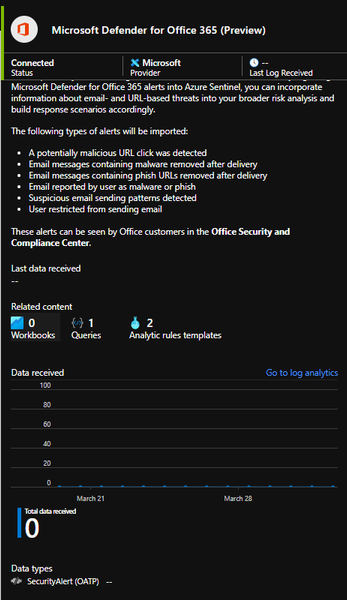
- Apr 08, 2021Got this sorted via an MSP ticket. It seems it only ingests some specific alert categories from Office 365 and not all.

JBUB_Accelerynt
Apr 02, 2021Brass Contributor
Hello Yash,
Have you checked to see if you have any alerts in protection.office.com? The connector only receives a log entry for an actual alert.
Also - Prerequisites
To integrate with Microsoft Defender for Office 365 (Preview) make sure you have:
Workspace: read and write permissions are required.
Tenant Permissions: required 'Global Administrator' or 'Security Administrator' on the workspace's tenant.
License: required Microsoft Defender for Office 365 Plan 2 (included with the Office 365 E5, Office 365 A5, and Microsoft 365 E5 licenses, and available for purchase separately)
Thank You
Jon Bub
Arbala Security
Have you checked to see if you have any alerts in protection.office.com? The connector only receives a log entry for an actual alert.
Also - Prerequisites
To integrate with Microsoft Defender for Office 365 (Preview) make sure you have:
Workspace: read and write permissions are required.
Tenant Permissions: required 'Global Administrator' or 'Security Administrator' on the workspace's tenant.
License: required Microsoft Defender for Office 365 Plan 2 (included with the Office 365 E5, Office 365 A5, and Microsoft 365 E5 licenses, and available for purchase separately)
Thank You
Jon Bub
Arbala Security

Apr 02, 2021
Hello Jon,
Yes that's how I got to know that the connector is not working. I have alerts getting generated daily in the S&C center but most of them are missing in Sentinel. In fact, there is not even a single event or log generated which is bothering me the most.
Also, I have checked for the pre-requisites and they are already in place.
Yes that's how I got to know that the connector is not working. I have alerts getting generated daily in the S&C center but most of them are missing in Sentinel. In fact, there is not even a single event or log generated which is bothering me the most.
Also, I have checked for the pre-requisites and they are already in place.
- Apr 08, 2021Got this sorted via an MSP ticket. It seems it only ingests some specific alert categories from Office 365 and not all.
 Humza_BukhariSep 22, 2023Tin Contributorcan you please tell me how your issue is sorted ? coz i am facing the same issue
 KishorebkApr 10, 2021Copper ContributorHey @Yash
Would it possible to share the list of specific alert categories which gets ingested and is there a option to ingest other alerts?
Kishore- Apr 10, 2021Sure Kishore, below is the page that specifies the list of alerts:
https://docs.microsoft.com/en-us/azure/sentinel/connect-office-365-advanced-threat-protection
Regarding ingesting other alerts ,the only way I have found is to define a logic app and specify the alert vendor as 'Office 365 Security and Compliance' and it works.
 DeletedApr 08, 2021Not applicablehi Yash,
Can you answer my question?- Apr 10, 2021Sorry mate, couldn't understand your question. Can you please elaborate.