Forum Discussion

Understanding security and privacy of Delve and intelligent experiences in Office 365

Delve just created a bit of shock for us. My contractor called and told me that she can see all documents that she is supposed not to see on her page. That includes HR forms, invoices, and other things. These are documents that are on my One Drive and is not shared with anyone. Is there a way to disable this feature enterprise wide?
By the way, why is the default security settings on One Drive set to the lowest security level. Also, when you turn on new features give your customers an option to turn in on and not just turn on without their permission especially for features like Delve. I understand you want higher rate of adoption. But often times it is creating too much head ache for IT admins.
Thanks
Rajesh

Yes, you can turn this off or just opt-out but it's not necessarily that simple. First, check out this:
https://support.office.com/en-gb/article/Office-Delve-for-Office-365-admins-54f87a42-15a4-44b4-9df0-d36287d9531b
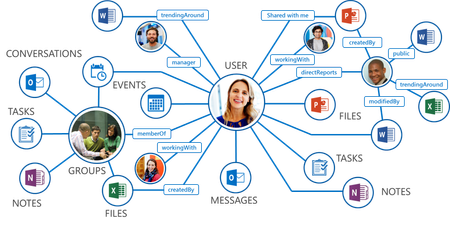
In the 'Control access to the Office Graph' section, you will see the steps to disable Office Graph in the tenant, which powers Delve. Bear in mind, Office Graph does a lot more than just Delve and you loose considerable functionality by taking this path.
If you read some of the resources in this discussion, you will see Delve never changes any permissions and only surfaces what users have already been given access to. By disabling Office Graph, users can still access these documents by other means, so it's better to look at the underlying issues and deal with those.
Check that documents haven't been saved to the 'Shared with everyone' folder in OneDrive, as that would open them up to everyone. Otherwise, there must be some permissions to grant access or have been shared in some way for the contractor to have been able to see the documents. If there is no indication on further inspection why this is happening, I'd consider logging a service request, as it just doesn't sound right.
Another option is to opt-out of Delve as covered here -
https://support.office.com/en-gb/article/Are-my-documents-safe-in-Office-Delve-f5f409a2-37ed-4452-8f61-681e5e1836f3#bkmk_optout
Hope you get to the bottom of this. I know it can be a shock with these incidents but Delve is really a great feature once understood and everyone knows what to expect from it.
- Rajesh K HaridasNov 04, 2017Copper Contributor
Thanks for the quick response. My OneDrive default settings is to not share anything with anyone. Anything that is shared has to be explicitly configured. However, I think documents that were outside of this was showing up on Delve. I must say that I have to cross check on this one and will do that.
By the way, do you have some practical examples or uses cases for enabling Delve? If it is such a powerful tool, we certainly want to know what value it can add to us. However, the first experience of it was not good.
Regards
Rajesh
- Cian AllnerNov 05, 2017Silver Contributor
No problem, I'd start here which has a nice set of resources - https://productivitylibrary.fasttrack.microsoft.com/en-us/office/envision/productivitylibrary/discover-relevant-content-and-people. You might want to check out some Ignite presentations as well, such as:
Build your personalized and social intranet with SharePoint, Yammer, Delve, OneDrive and Teams
How Graph powers intelligent experiences in SharePoint and Office 365
- Rajesh K HaridasNov 05, 2017Copper Contributor
Thanks Cian.