Forum Discussion

JustTom
Dec 30, 2025Copper Contributor
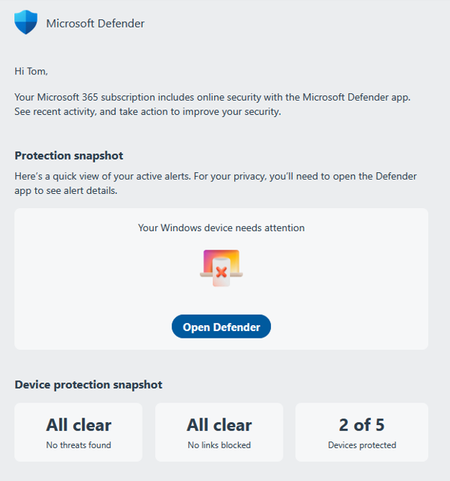
I have absolutely no idea what Microsoft Defender 365 wants me to do here
The process starts with an emal: There's more below on the email - an offer for credit monitoring, an option to add another device, an option to download the mobile app - but I don't want to do ...

Prashbv
Mar 26, 2026MCT
“Action recommended” is a warning badge shown by Microsoft Defender to indicate that the device still requires attention. This typically appears when one or more security actions haven’t completed, such as:
- Pending security or protection intelligence updates
- A scan that hasn’t finished
- A protection feature that is turned off or not fully enabled
In most cases, this is a local device state rather than a Defender service issue.
- Check the Windows Security status on the device
On the affected PC, open Windows Security and review the yellow “Actions recommended” message under Security at a glance.
Then go to Virus & threat protection → Protection updates, select Check for updates, and once complete, run a Quick scan.
This warning is commonly triggered by outdated security intelligence or an incomplete scan. - Install pending Windows updates and restart the device
Navigate to Settings → Windows Update → Check for updates, install all available updates, and reboot the device.
The badge often clears only after Windows and Defender components fully apply updates and reload following a restart.
If the message persists after these steps, it’s usually worth confirming that all protection features (real‑time protection, cloud‑delivered protection, and tamper protection) are enabled.
If you find the answer useful, please do not forget to like and mark it as a solution 🙂