Forum Discussion

Defender for iOS: “This account has reached its devices limit” even though no devices are listed
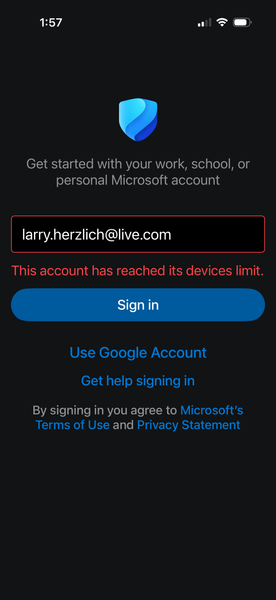

Hi Herzlich
What you are seeing is a known scenario with Microsoft Defender for individuals on mobile devices. The device limit enforcement is handled by the Defender service backend, not by the list of devices visible in your Microsoft account portal.
Because of that, the device count shown in the account UI and the device quota used by Defender can become out of sync. This can happen in situations like:
- The phone is erased or factory-reset while Defender is still registered
- A device is migrated to a new phone using iOS transfer
- The Defender sign-in process fails before the device deregisters
- A device is removed locally but the server registration remains
In those cases the Defender backend may still think the device is consuming one of the mobile device slots, even though no devices appear in the account portal.
Unfortunately there is no self-service way to clear this. The mobile enrollment record must be reset on the Defender backend by Microsoft support.
When contacting support, clearly describe the situation so it gets routed to the correct team. For example:
“Microsoft Defender for iOS shows ‘This account has reached its devices limit’ even though no devices appear in my Microsoft account. My old iPhone was erased while Defender was still signed in. Please reset the Defender mobile device enrollment for my account.”
The Microsoft 365 / Defender consumer support team has access to the internal tools needed to clear the mobile enrollment record and release the device slot.
Once the backend record is reset, signing in on the new device should complete normally.