Forum Discussion

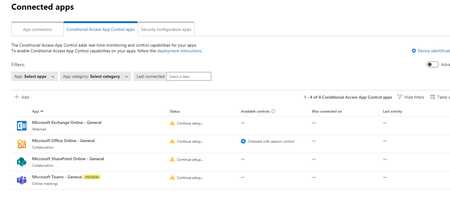
you dont have any apps deployed with conditional access app control
 Apr 10, 2023
I had the same issue , it turns out it will not detect the App until after you trigger conditional access on the App , so you must sign in to the App with a user that is applying to the policy.
You will need to wait for a couple of minutes for this to take effect , you can also inspect the sign-in logs of the user from Azure AD portal to make sure that the conditional access policy is applied to the sign-in attempt.
This is mentioned in the docs
Regards
Amr

Can you please share the goal that you want to reach with your configuration? It will be better to help you if we know your use case.
If it is to secure the access to O365, you can do that with the Conditional Access blade located in Azure Active Directory.

Hi Dear, NicolasHon
Yes you are wright I can use Conditional Access but when I need to configure (use custom policy tab) its till me :Custom policies need to be configured in Cloud App Security portal
I've watched a lot of video that teach how to use a MCAS, like how to block access or download from non compliance or even compliance device if the document match the session policy for specific criteria like National ID or any other specific world .
to configure these policy through Microsoft defender for cloud apps you must first configure :
connected apps > then Conditional Access App Control .
I added Microsoft office online ,Microsoft exchange online , Microsoft share point online , and team.
there is no help how to configure and add those apps to Conditional Access App Control . I need help to configure these apps to allow defender for cloud app to connect . there is no explanation into internet . could you please help me
I read a lot of articles at Microsoft also there is no data specifically for add what I mention above
- JaredPoeppelmanJan 12, 2022Former Employee
For apps on this list, you must follow these instructions. For all other apps, you must follow these instructions.
- khaldunazarJan 12, 2022Copper Contributor
Thank you for your replay
I read this article before how to add app to conditional access
https://docs.microsoft.com/en-us/defender-cloud-apps/proxy-deployment-aad
what I need? there is no exact article explaining how to add your office 365 subscription { exchange , teams , etc} to ((( Conditional Access App Control Apps)))
Like what I will show you in image I searched all the internet no one discussing
Just I need my office apps you can find how to add google amazon and a lot of product but not your office app
I know that I need to create a conditional access session policy, but after that you need some apps to work with defender for cloud apps
- JaredPoeppelmanJan 25, 2022Former Employee
Yes, I could see how that is confusing.
Since O365 apps are already configured to use Azure AD as the identity provider (IDP), you can still use the instructions for featured apps, but skip straight to step 2.
Hope that helps.
- NicolasHonDec 31, 2021Brass ContributorAhh ok understood. So I can sadly not help you as we don't user Cloud App Security yet. But I'm interested if you can post your solution once you find it 🙂
Did you try to open a ticket by Microsoft? I've always had good experiences with the support for Azure.- khaldunazarJan 01, 2022Copper ContributorI will, one Ihave a replay from Microsoft will get back with answer


