Forum Discussion

Microsoft Defender Endpoint Security Policies
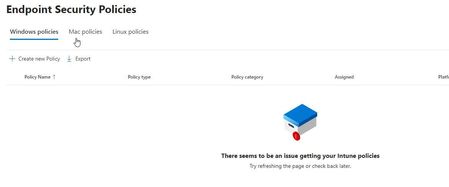
 Sep 30, 2024
Sound like you want to go the MDE Attach route (https://learn.microsoft.com/en-us/mem/intune/protect/endpoint-security-policy
An Intune license assigned to your admin will make is easier but the following option should work:
- Add the Entra group with your admin(s) to Defender XDR > Settings > Endpoints > Intune permission
- This will create an MDE endpoint security manager assignment to Intune's Endpoint Security Manager role
- You can confirm that this worked by going to Intune > Tenant Admin > Roles > Endpoint Security Manager > Assignments
- https://learn.microsoft.com/en-us/mem/intune/protect/endpoint-security-policy#assign-role-based-access-controls-for-endpoint-security-policy
If you haven't done yet, you'll also need to enable MDE attach (= security config management) for your device groups under Defender XDR > Settings > Endpoints > Enforcement Scope
Also ensure that you have the connector enabled for this to work in Intune (https://learn.microsoft.com/en-us/mem/intune/protect/mde-security-integration#configure-your-tenant-to-support-defender-for-endpoint-security-settings-management)
- Add the Entra group with your admin(s) to Defender XDR > Settings > Endpoints > Intune permission

am1357 Devices are hybrid azure ad joined with GPO onboard to MDE.
Sound like you want to go the MDE Attach route (https://learn.microsoft.com/en-us/mem/intune/protect/endpoint-security-policy
An Intune license assigned to your admin will make is easier but the following option should work:
- Add the Entra group with your admin(s) to Defender XDR > Settings > Endpoints > Intune permission
- This will create an MDE endpoint security manager assignment to Intune's Endpoint Security Manager role
- You can confirm that this worked by going to Intune > Tenant Admin > Roles > Endpoint Security Manager > Assignments
- https://learn.microsoft.com/en-us/mem/intune/protect/endpoint-security-policy#assign-role-based-access-controls-for-endpoint-security-policy
If you haven't done yet, you'll also need to enable MDE attach (= security config management) for your device groups under Defender XDR > Settings > Endpoints > Enforcement Scope
Also ensure that you have the connector enabled for this to work in Intune (https://learn.microsoft.com/en-us/mem/intune/protect/mde-security-integration#configure-your-tenant-to-support-defender-for-endpoint-security-settings-management)