Forum Discussion

Defender of Endpoint on Comanaged Laptop
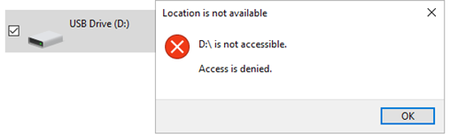

Hi, it’s happening because Device Control isn’t supported on devices managed only by Defender (without Intune). In your co-managed scenario, you may see intermittent behavior due to policy sync delays or conflicts between Intune, SCCM, and any GPOs.
Suggestions:
-Make sure the Endpoint Protection workload is truly moved to Intune
-Force policy sync from both Intune and the client
-Check security/Device Control logs for conflicts
-Reboot after policy application
As for replacing “Access Denied” with a custom message, Windows doesn’t provide a built-in way to override that system error text.
 SochitoMar 08, 2025Brass Contributor
Thank you Michelariis, now the device is managed by Intune but behaviour is still the same.
Endpoint Protection, device management workloads are moved to Intune for a pilot collection and the machines are member of that collection.
Policy forced several Times behaviour is still the same
Please share the location of of Device control logs