Forum Discussion

LoicM
Jun 27, 2022Brass Contributor
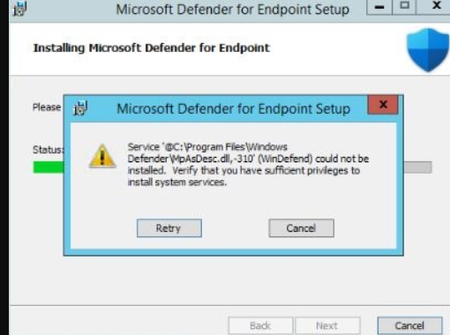
Defender for Endpoint - Unified onboarding failed on 2012 R2 - MpAsDesc.dll 310
Hello, We have some 2012 R2 servers which failed to install the new onboarding package. Error code 1603. Message is Verify that you have sufficient privileges to install system services. ...

yongrheemsft Microsoft
Jul 28, 2022MicrosoftHi LoicM,
Step 1) Go to Add/Remove Programs (AppWiz.cpl) and make sure that there are no other Antimalware (e.g. SCEP) and/or EDR products installed.
Step 2) Have you tried installing using the "Installer script" documented here:
https://docs.microsoft.com/en-us/microsoft-365/security/defender-endpoint/server-migration?view=o365-worldwide#installer-script
Step 3) Make sure that you have the latest* MDE installation package for Windows Server 2012 R2.
Note: * = (installs version 10.8048.22439.1065)
Which is documented here:
Microsoft Defender for Endpoint update for EDR Sensor
https://support.microsoft.com/en-us/topic/microsoft-defender-for-endpoint-update-for-edr-sensor-f8f69773-f17f-420f-91f4-a8e5167284ac
and which points to https://catalog.s.download.windowsupdate.com/d/msdownload/update/software/defu/2022/03/updatesenseclient_1f7a78831f74f6c0e277d5033844a41b9f49855a.exe
Step 4) If none of these help, please open a Microsoft support ticket (case).
Have the following handy:
aka.ms/MDEClientAnalyzer
A verbose MSI log
https://docs.microsoft.com/en-us/troubleshoot/windows-client/application-management/enable-windows-installer-logging#enable-windows-installer-logging-manually
A Process Monitor (ProcMon) while trying to install MDE
https://docs.microsoft.com/en-us/microsoft-365/security/defender-endpoint/troubleshoot-performance-issues?view=o365-worldwide#capture-process-logs-using-process-monitor
Thanks,
Yong Rhee - MSFT
Step 1) Go to Add/Remove Programs (AppWiz.cpl) and make sure that there are no other Antimalware (e.g. SCEP) and/or EDR products installed.
Step 2) Have you tried installing using the "Installer script" documented here:
https://docs.microsoft.com/en-us/microsoft-365/security/defender-endpoint/server-migration?view=o365-worldwide#installer-script
Step 3) Make sure that you have the latest* MDE installation package for Windows Server 2012 R2.
Note: * = (installs version 10.8048.22439.1065)
Which is documented here:
Microsoft Defender for Endpoint update for EDR Sensor
https://support.microsoft.com/en-us/topic/microsoft-defender-for-endpoint-update-for-edr-sensor-f8f69773-f17f-420f-91f4-a8e5167284ac
and which points to https://catalog.s.download.windowsupdate.com/d/msdownload/update/software/defu/2022/03/updatesenseclient_1f7a78831f74f6c0e277d5033844a41b9f49855a.exe
Step 4) If none of these help, please open a Microsoft support ticket (case).
Have the following handy:
aka.ms/MDEClientAnalyzer
A verbose MSI log
https://docs.microsoft.com/en-us/troubleshoot/windows-client/application-management/enable-windows-installer-logging#enable-windows-installer-logging-manually
A Process Monitor (ProcMon) while trying to install MDE
https://docs.microsoft.com/en-us/microsoft-365/security/defender-endpoint/troubleshoot-performance-issues?view=o365-worldwide#capture-process-logs-using-process-monitor
Thanks,
Yong Rhee - MSFT

LoicM
Aug 22, 2022Brass Contributor
None of this worked for us, most of the time we are able to install after 2 or 3 retries.
1st install fails,
1st retry it will detect Windefend service, try to uninstall it,
Reboot needed
2nd retry, it works or we have to go again for another reboot and after that it works.
Upgrading on 2016 having been really easy and we have around 500 servers with unified onboarding without need for manual intervention.
2012 R2 we are at 75 servers and we had to manually install and multiple reboot due to this issues on almost 50% of servers.
It's not the end of the story, we just discovered MSSense high cpu usage on some 2012 R2 servers and first analysis from procmon show endless "Query Directory" C:\Windows\System32\catroot\{F750E6C3-38EE-11D1-85E5-00C04FC295EE}\*.cat
To be honest, right now we are reconsidering switch to defender for 2012 R2 as it seems not reliable.
1st install fails,
1st retry it will detect Windefend service, try to uninstall it,
Reboot needed
2nd retry, it works or we have to go again for another reboot and after that it works.
Upgrading on 2016 having been really easy and we have around 500 servers with unified onboarding without need for manual intervention.
2012 R2 we are at 75 servers and we had to manually install and multiple reboot due to this issues on almost 50% of servers.
It's not the end of the story, we just discovered MSSense high cpu usage on some 2012 R2 servers and first analysis from procmon show endless "Query Directory" C:\Windows\System32\catroot\{F750E6C3-38EE-11D1-85E5-00C04FC295EE}\*.cat
To be honest, right now we are reconsidering switch to defender for 2012 R2 as it seems not reliable.
- yongrheemsftAug 22, 2022LoicM, sorry to hear about the challenges with the 2012 R2 install.
Regarding the high cpu in MSSense and .cat, can you please open a Microsoft support ticket, it's something that we should be able to take care of.
Thx,
Yong - MSFT