Forum Discussion

Defender Device Groups
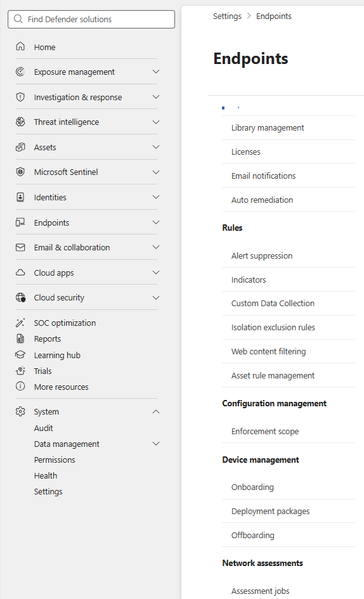

Hi Alex,
Device groups live under Settings, not directly under Permissions.
Go to Settings > Endpoints > Permissions section > Device groups.
or Direct link: https://security.microsoft.com/securitysettings/endpoints/machine_groups
From there, select Add device group, then:
- On the General page, set a name, remediation level, and optional description
- On the Devices page, set the matching rule (device name, domain, tags, or OS platform) that determines which devices land in the group
One thing worth knowing, creating device groups requires the Security Administrator role, so if the option isn't visible or feels greyed out, check your assigned role first before assuming it's a navigation issue.

I couldn't find the path you mentioned, and when I tried the direct link, I was redirected to the home page.
Is there any licensing restriction? I have the Security Administrator role.
- GokselATAKANAug 06, 2026Brass Contributor
Hi Alex,
Correction on my earlier reply, that path only applies if you're on standalone Defender for Endpoint Plan 1 or Plan 2.
If your org is on Defender for Business (bundled with Business Premium, for example), there's no Device groups page under Settings at all. Device groups work differently there, you define them inline while creating or editing a policy at security.microsoft.com/policy-management, and they're stored in Microsoft Entra ID rather than in the Endpoint settings area. That would explain both the missing Permissions section and the redirect on the direct link.
Can you confirm which Defender for Endpoint plan/license you're on? If you are on Endpoint P1/P2 and still hitting a redirect, that matches a known issue some tenants have reported where the Device groups page just doesn't provision correctly, in that case it needs a support ticket through Microsoft, not something fixable from the admin side.
- alexcolombariAug 07, 2026Copper Contributor
I found the problem.
A few weeks ago we upgraded the Defender licenses to P2 and assigned them to users. However, we didn't notice that it was necessary to go to the licenses panel (Settings > Endpoints > Licenses) and switch from Business Premium to P2 Plan.
After making the change, the device groups appeared.
Thanks for the help!