Forum Discussion

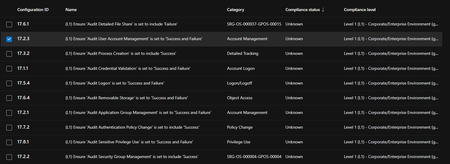
Baseline Assesment Auditing Status Unknown

Hello Carlos_Valencia!
I’ve seen this before. The “Unknown” auditing status usually happens if the devices haven’t reported back properly or if there’s a mismatch in configurations. My recommendation would be to check if the devices are properly connected to Microsoft Defender and ensure that the auditing configurations are correctly set up on each device.
You might also want to verify that the devices are running the latest updates for Defender.
For doing that first check if the devices are connected to Microsoft Defender by looking at their connection status in the Defender portal. Make sure the devices have the latest updates installed, especially for Defender. Then, check the auditing configurations in the Defender settings to ensure they match what’s set in the Baseline Profile.
Finally you could also check the event logs on the devices to see if there are any issues related to reporting or compliance.
Regards,
 Carlos_ValenciaFeb 12, 2025Copper Contributor
Hi Luchete, thanks for your assistance
The devices are properly connected to Microsoft Defender y the auditing configuration are correctly set up on the device.
Could you tell me what event logs I should check?
Could it be a bug in the platform?
Regards
 iwannaknow51Mar 12, 2025Copper Contributor
Did you figure this out? Experiencing the same thing.
- Carlos_ValenciaMar 12, 2025Copper Contributor
Hi
I opened a ticket with Microsoft Support and they tell me that it Is a product limitation. That was his answer: "I have confirmed that this is currently a product limitation for this ticket"
Now the product changed the auditing status from Unknown to Manual Check..
- lucheteFeb 12, 2025Steel Contributor
Hello Carlos.
In this link you can check how to find the log events for Microsoft Defender for endpoints and description for the events.
https://learn.microsoft.com/en-us/defender-endpoint/event-error-codes
Regards