Forum Discussion

Dr_Snooze
Jul 05, 2022Brass Contributor
Attack Surface Reduction Audits are Not Appearing in My Reports
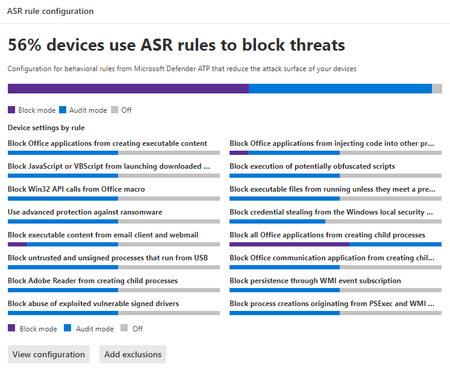
I'm relatively new to Defender for Endpoint (P2), and am still trying to set up my environment. Following the instructions, I created a number of Attack Surface Reduction rules and set them to Audit ...

aexlz
Jul 07, 2022Brass Contributor
Hi
This table of content always lacks the complete rule-set. Don’t ask my why. I guess it only consolidates the most recent.
I suggest you to use AdvancedThunting. You can build querys there, which explicitly queries for the certain audit-event.
You can review the results there also export them.
Cheers Axel
This table of content always lacks the complete rule-set. Don’t ask my why. I guess it only consolidates the most recent.
I suggest you to use AdvancedThunting. You can build querys there, which explicitly queries for the certain audit-event.
You can review the results there also export them.
Cheers Axel
- Dr_SnoozeJul 07, 2022Brass ContributorThanks Axel. I'll look into that. I also opened a trouble ticket with MSFT yesterday and sent them some logs. I'll update if that turns up anything helpful.
- aexlzJul 07, 2022Brass Contributor
Dr_Snooze, just to give you an idea:
DeviceEvents | where ActionType startswith "Asr" | where ActionType contains "Audit" | where Timestamp > ago(30d) | extend RuleGuid = tolower(tostring(parsejson(AdditionalFields).RuleId)) | summarize EventCount=count() by ActionType- Dr_SnoozeJul 07, 2022Brass ContributorIf you can believe it, that only gets me results for 2 policies. But both policies are now showing in my ASR report. ?!
