Forum Discussion

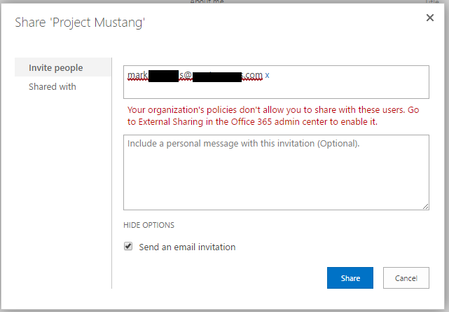
Sharing to External Users in an Office 365 Group
- May 25, 2017
Have you manually enabled (by PowerShell) the external sharing for that Group?
See https://support.office.com/en-us/article/Turn-external-sharing-on-or-off-for-SharePoint-Online-6288296a-b6b7-4ea4-b4ed-c297bf833e30#ID0EAABAAA=Office_365_Groups

Yes, it will allow sharing with every MSA or Work and School Account.
If you don't run the PowerShell command, you will be able to share only with external users already existing in your directory, if any.

Is it just me or does this all sound completely bonkers? As a small business, we don't have an IT department and I'm responsible for keeping things running. I can generally find my way around the Admin Centre, but have never used PowerShell and don't see why I should need to. All the Admin Centre settings are set so that external sharing should work ... but it doesn't ... and the answer is to use PowerShell!?!? If the Admin settings only do half the job, why bother having them at all, why not just tell customers that they can only do external sharing if they get a highly paid SharePoint administrator who knows how to use PowerShell ... or have I missed something?
 Jer HarwoodMay 07, 2018Brass Contributor
Oz Oscroft and others - I was having similar frustrations but found from https://docs.microsoft.com/en-us/powershell/module/sharepoint-online/set-spotenant?view=sharepoint-ps(scroll down to the -SharingCapability switch section) we have another option so you don't have to enable anonymous sharing. I got an error with the ExternalUserAndGuestSharing switch since my tenant is set to only allow authenticated external users. Using the switch ExternalUserSharingOnly did the job for the site collection I needed.
That said, oddly it seems to have pushed the change for the tenant and all site collections, as now checking on sites that I know didn't allow new external users do now. They are also site collections that came back showing ExistingExternalUserSharingOnly using PS previously to check the setting. Now they show ExternalUserSharingOnly as a result using the same command:
Get-SPOSite -Identity https://<tenantname>.sharepoint.com/sites/<sitename>| flI was also troubleshooting where certain site collections would allow for new external users while others didn't. The commonality seemed to be that sites created from the SharePoint home allowed for it as all settings would indicate in the Admin center GUI. Sites created via MS Teams did not. I even created a new Team to test and sure enough it was set to ExistingExternalUserSharingOnly after being created and I couldn't add new external users. Three hours later I check the same site and now it's set to ExternalUserSharingOnly - it changed!
I know for a fact none of these sites were updated in between the time of running the set PS command on the single site collection and a few hours later. We're okay with this being pushed across all collections but still extremely odd.
- Oz OscroftSep 22, 2017Iron Contributor
Well, I've just spent 45 minutes on the phone to a very helpful Microsoft Tech. For the benefit of others, I'd summarise as follows:
- All the sharing settings in the Admin Center and SharePoint Admin Center are just to setup sharing options at the very top (tenant) level.
- If you then need to share content from a specific group with external users you need to turn on this ability using Powershell (I still think that's bonkers, but hey, ho).
- The Powershell code (to be run as an admin) is:
- a. Set-ExecutionPolicy Unrestricted
- b. $UserCredential = Get-Credential
- c. Connect-SPOService -URL https://<domain>-admin.sharepoint.com
- Set-SPOSite -Identity https://<domain>.sharepoint.com/sites/<sitename> -SharingCapability ExternalUserAndGuestSharing
Now, this didn't work for me first time as it said I was restricting settings to lower options than in the SharePoint Admin Centers. I therefore changed access in there to allow anonymous access, ran the code again and then changed the Admin Center setting back.
All now works perfectly! Hurrah.
Thanks for the input from people on here.
- Salvatore BiscariSep 22, 2017Silver Contributor
Hi Oz.
The actual trend is to require PowerShell for all "advanced" settings. Only "basic" settings are configurable in the Admin UI. (Of course it is arguable what is "basic" and what is "advanced"...)
Also, it is quite common to require PowerShell in order to tweak settings for new features: the corresponding Admin UI is often introduced later.
Hence, IMHO, you should start to learn the basics of PowerShell: it should not be so difficult...