Forum Discussion

Broken Office 365 Group Calendar
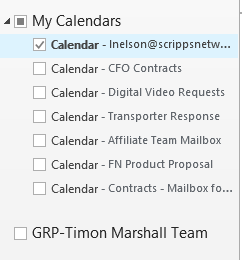
- Feb 10, 2017
Making the Group a "Favorite" from the Group's interface under the ...'s is what controls whether Outlook picks it up and displays it in the My Calendars list. If somehow she has not favorited the Group, that might explain why she can't seem to take action on it.


Cany you right-click on it, if yes you can try removing it from the list and restart Outlook. In general, Autodiscover needs to be working properly for Groups to work as expected in Outlook, does she have issues with any other Group functionality (accessing conversations or accessing another Group calendar)?

All other aspects of the group seem to be working properly for her. I'll look into your suggestion, though. Thanks!
- David RosenthalFeb 10, 2017
Microsoft
Making the Group a "Favorite" from the Group's interface under the ...'s is what controls whether Outlook picks it up and displays it in the My Calendars list. If somehow she has not favorited the Group, that might explain why she can't seem to take action on it.
- Greg EdwardsFeb 10, 2017Iron ContributorI think that was it. We went into her Folders view and found the group calendar there. We were able to right-click the calendar and add it as a favorite. We were then able to delete the Calendar Group heading. Everything is working great now. Thanks!