Forum Discussion

What does the "Users can add gallery apps to their Access Panel" setting mean?
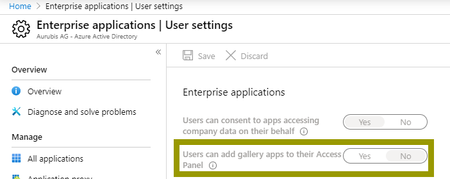

Hi VasilMichev,
But of course I read the tooltip, but unfortunately I did not understand it 😉
I'm not quite sure what this setting looks like from an end-user perspective.
Where can a user add SSO apps in his Access panel/MyApps if the setting is set to "yes"? Is see no option, and it is ever probably not meant that the user has the possibility to log in with his O365 account e.g. at Doodle? That's what the "
And I'm not sure what the phrase "...without an admin needing to pre-integrate that application..." means.
Bye
Jens

This is for apps to which you cannot login directly, but have to provide username/password instead, separate from your Azure AD credentials. The usual example is something like accessing company's Twitter account - you need to configure the set of credentials first, and this is where the admin comes in. It has nothing to do with consent, that's separate control. Read the article I linked to above, it should hopefully make things a bit clearer.
- TheHailenderMay 05, 2020Brass Contributor
HI VasilMichev,
Thanks for your patience. But I still don't get it. How can a user add an app to his Acces Panel without an admin having to pre-integrate the app? For me, pre-integration means that the app has to be assigned to a user
and has to be made visible to the user
Or does it all have something to do with the self-service functionality?
- VasilMichevMay 05, 2020MVP
Integration here means setting up the credentials to be used by the app.