Forum Discussion

SignInLogs are not showing in Log Analytics / Azure Monitor
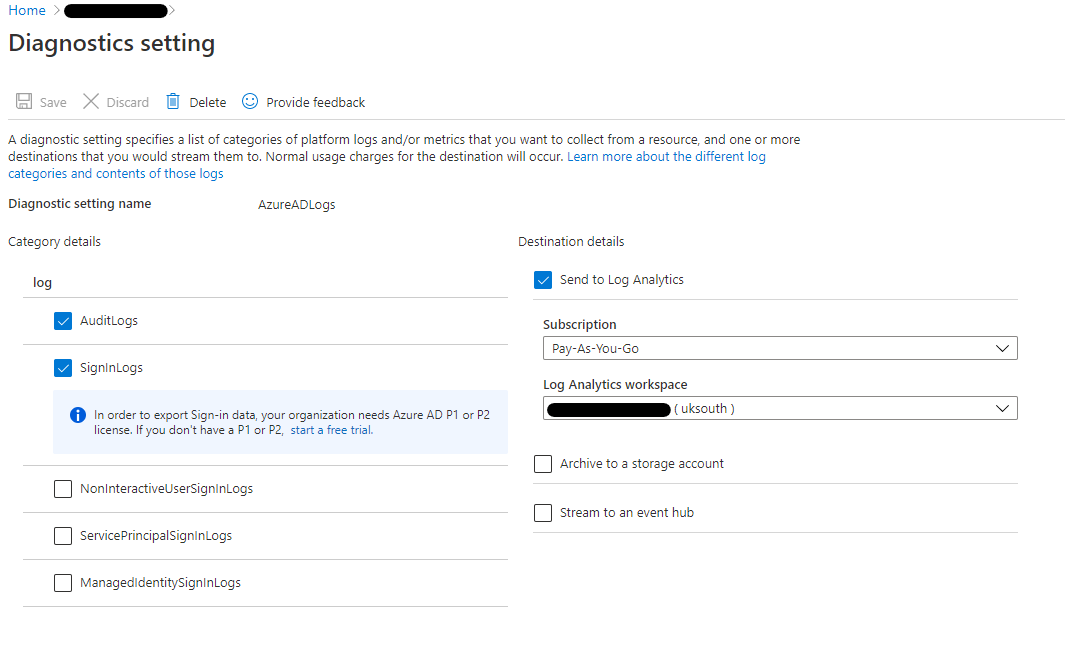


If be interested to know if that speeds things along.

Ben Owens Sergg I am also missing sign-in logs even after waiting 24 hours.
Are evaluation trial licensing not supposed to be full featured or is it a bug that Microsoft needs to fix?
Are there some extra steps required to test setting up email alerts for sign-in activity (breakglass account etc.) when using P1/P2 trial licensing?
- Ben OwensSep 01, 2021Brass Contributor
KalimanneJ I should have waited a few minutes more.
I now have the SignInLogs showing as well. So within 15-20 minutes of setting up the diagnostics, I have both SignInLogs and AuditLogs showing in AzureMonitor/LogAnalytics.
Could you purchase 1 Azure AD P1 or Azure AD P2 license for your trial tenant and see whether that kicks things into action on your tenant and results in the SignInLogs being output?
Not sure about the context of your work, but if it's testing, then it may be worth spinning up a developer tenant as the licenses run for a longer time and, as proved above, outputs the SignInLogs successfully without having to purchase a license.
- Ben OwensSep 01, 2021Brass Contributor
KalimanneJ in short, I don't know. It's been a while since my original post.
I've enabled LogAnalytics for SignInLogs and AuditLogs today on a developer tenant.
Within a few minutes, the AuditLogs show up, populated with some entries. No SignInLogs showing yet, but I'll let you know how long it takes to show up.
For context, I'm enabling this on an M365 Developer Tenant which has 25 M365 E5 licenses assigned, so therefore Azure AD Premium 2 is in place. I have no purchased licenses.
I'm using my MSDN subscription for the LogAnalytics workspace.