Forum Discussion

Jgq85
Jun 26, 2020Brass Contributor
Hybrid AD Join with Okta - SCP? possible? how?
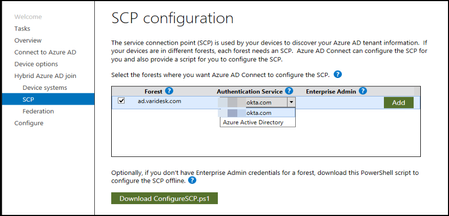
I came across this SCP configuration step when turning on Hybrid AD Join options in our Azure AD Connect tool. I'm not sure what to choose here: Okta or Azure Active Directory? Okta doesn'...

MikeWardUSI
Jul 13, 2022Copper Contributor
cyber-tk I am looking at the same situation here. Wondering what you ended up doing for SCP selection? *.okta.com, Azure AD, etc.
I want to convert my existing hybrid AD from having my devices AD Registered to AD Hybrid Joined and I'm confused around whether to just use the existing OKTA SCP in the ADConnect configuration or if I am overlooking something.

cyber-tk
Jun 14, 2023Copper Contributor
I ended up choosing Azure AD Directory in my config and it is working well. Honestly, I don't see a big advantage for the hybrid set up, so we are now just moving all our new devices to Azure AD Joined only and set up up GP in Azure. If you do, do Azure AD joined or Hybrid Joined you do have to set up Okta so it can authenticate when joining new devices using this set up.
https://www.okta.com/resources/whitepaper/using-okta-for-hybrid-microsoft-aad-join/
Scroll down to the part where you see this and set up the Windows-AzureAD-Authentication-Provider/1.0 as the provider in Office 365. I have this set to only trusted networks. After it is joined people can still authenticate off the trusted networks. It seems to be just the initial join.
https://www.okta.com/resources/whitepaper/using-okta-for-hybrid-microsoft-aad-join/
Scroll down to the part where you see this and set up the Windows-AzureAD-Authentication-Provider/1.0 as the provider in Office 365. I have this set to only trusted networks. After it is joined people can still authenticate off the trusted networks. It seems to be just the initial join.