Forum Discussion

sprazapati
Jun 21, 2021Brass Contributor
Facing issue on Azure AD connect
When I run application it is showing your domain is not routable. Use oth
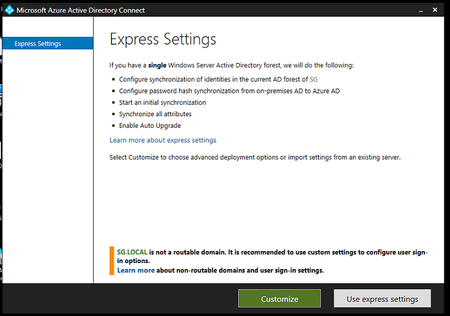
- Jul 10, 2021You can still use a non-routable domain in the AAD connect, but the syned account to AzureAD will not have the preferred domain and will have @<tenantname>.onmicrosoft.com suffix.
You will have to go to MSOL PowerShell to change the UPN for the user.
connect-msolservice (enter the credentials of the Global admin or the relevant role based account)
set-msoluserprincipalname -userprincipalname user@<tenantname>.onmicrosoft.com -newuserprincipalname user@domain.com

shehanjp
Jul 10, 2021Iron Contributor
You can still use a non-routable domain in the AAD connect, but the syned account to AzureAD will not have the preferred domain and will have @<tenantname>.onmicrosoft.com suffix.
You will have to go to MSOL PowerShell to change the UPN for the user.
connect-msolservice (enter the credentials of the Global admin or the relevant role based account)
set-msoluserprincipalname -userprincipalname user@<tenantname>.onmicrosoft.com -newuserprincipalname user@domain.com
You will have to go to MSOL PowerShell to change the UPN for the user.
connect-msolservice (enter the credentials of the Global admin or the relevant role based account)
set-msoluserprincipalname -userprincipalname user@<tenantname>.onmicrosoft.com -newuserprincipalname user@domain.com
 sprazapatiJul 10, 2021Brass ContributorThank You Sir