Forum Discussion

Did I accidentally provision Apple Internet Accounts with my own Azure AD user account
- Apr 18, 2020Azure Basic has functionality to keep a tenant secure, but it is, well... basic
First of all, I would recommend turning off User Application consent (like mentioned in the blog I added previously).
Secondly, I would really recommend configuring Multifactor Authentication.
MFA can be configured through two ways: Conditional Access and Security Defaults.
Security Defaults are a free option, check out this blog for more information:
https://365bythijs.be/2019/11/26/what-is-azure-ad-security-defaults-should-you-be-using-it/
I wouldn't worry about MDM and PIM during this time.
If you have configured MFA, you have a good baseline

Thanks for the reply Thijs Lecomte! 
That sounds like it could be useful although it does add an additional security concern as our O365 deployment is purely cloud based at the moment and adding the macOS mail client to the ecosystem would increase our attack surface a little.
What would happen if I deleted the account I used to provision it or changed that account's role memberships? Would Apple Internet Accounts still work?
Also to the best of my knowledge we don't have or use Apple Business Manager. More to the point the only Apple ID on my iPhone is my personal one and I certainly don't have it so I wonder what triggered that prompt on my device?

Nothing would happen if you made changes to the account.
An enterprise application is not dependent on a user account, it's an entity on it's own.
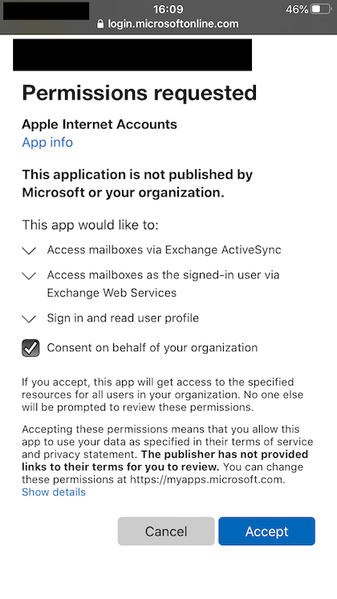
You received this prompt because you tried to configure the Apple Mail app on your iPhone.
 KdshipsApr 23, 2020Tin Contributor
Thijs Lecomte, a user told me that they got the prompt when they tried to configure email on a Mac. Is this possible on a Mac and ipad as well? I may have misunderstood the user, but I would love to know the difference.
- Thijs LecomteApr 24, 2020Bronze Contributor
It's possible. I don't know exactly how the Mail app on MacOS works.
Most third party apps that integrate with Office 365 (like reading emails) will provide these pop-ups
- madcatApr 18, 2020Tin Contributor
Thank you so much for your response and the blog links.
Do you think Azure Basic has sufficient functionality to secure our tenant against such threats?
We are only on Office 365 Essentials and trying to minimise costs at this difficult time (COVID) but I keep coming across documentation about elements such as conditional access policies, MDM, PIM etc. and wonder if they are necessary even for a small business.
- Thijs LecomteApr 18, 2020Bronze ContributorAzure Basic has functionality to keep a tenant secure, but it is, well... basic
First of all, I would recommend turning off User Application consent (like mentioned in the blog I added previously).
Secondly, I would really recommend configuring Multifactor Authentication.
MFA can be configured through two ways: Conditional Access and Security Defaults.
Security Defaults are a free option, check out this blog for more information:
https://365bythijs.be/2019/11/26/what-is-azure-ad-security-defaults-should-you-be-using-it/
I wouldn't worry about MDM and PIM during this time.
If you have configured MFA, you have a good baseline AmJassimOct 13, 2020Copper ContributorSo a GA user granted consent (admin consent) but the app isn’t showing under enterprise apps (or app registration), any ideas?
Can we allow certain users or groups to be able to do that?