Forum Discussion

How to add a complete Azure SQL Database while creating NEW Azure Cognitive Search Service Resource?
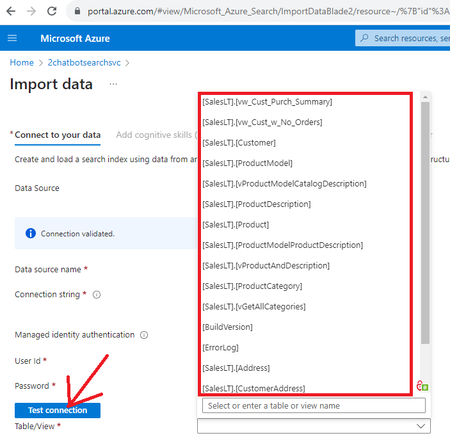

You may either create consolidated views or push data programmatically into a single index.
https://learn.microsoft.com/en-us/answers/questions/599111/search-data-in-multiple-tables

Azure Cognitive Search does not support adding an entire Azure SQL Database as a single object during resource creation or connection setup.
The “Test Connection” step is designed to validate access and select a specific table, view, or query, not to ingest all database objects automatically. There is currently no feature that allows selecting all tables/views in a database at once.
Azure Cognitive Search is not a database replication tool. It operates as a curated indexing engine, meaning data must be explicitly defined for ingestion into an index.
Recommended approach for your MIS KPI chatbot use case
Since your goal is to support natural language queries over business KPIs derived from aggregated data, the correct design pattern is:
- Create multiple KPI-specific SQL views representing business metrics (sales, revenue, churn, etc.)
- Treat each view as a semantic data source, not raw relational data
- Ingest these views into Azure Cognitive Search either:
- as separate indexes per business domain, or
- through a unified ETL pipeline that consolidates KPI outputs into a single structured index dataset
Why a single “all-in-one view” is not ideal
While technically possible, a single consolidated view often leads to:
- Loss of business meaning and ownership of KPIs
- Reduced maintainability of complex joins and aggregations
- Difficulty scaling across multiple business domains
Your approach of using multiple KPI-specific views is aligned with standard data warehouse and semantic layer design principles.
Key takeaway
Azure Cognitive Search is designed to index curated, business-ready datasets, not entire database schemas.
For MIS chatbot scenarios, the correct architecture is:
Multiple KPI views → Curated indexing layer → Azure OpenAI (RAG-based semantic query layer)