Forum Discussion

onurmicoogullari
Apr 15, 2021Copper Contributor
4K Display issue with BizTalk (in VS and BTS Administration Console)
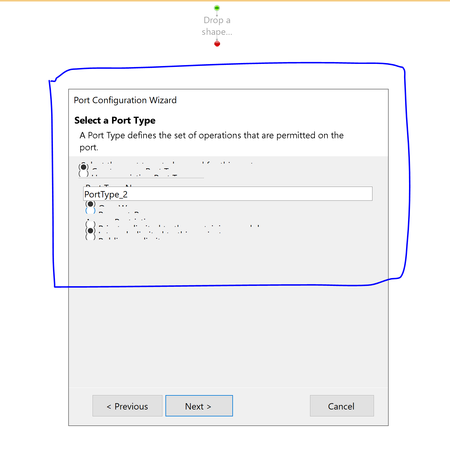
Hi, I am having major problems when trying to develop and administer BizTalk solutions on a 4K display. When scrolling left/right in the administration console: ...

NiklasE Microsoft
Sep 16, 2021MicrosoftDoes it help if you set scaling option in Windows display settings to 100% (assuming you may have 150% or 200% instead)?
What is the result of this powershell script? (getting details about resolution, scaling, monitors and version of VS 2019)
-------
Add-Type -AssemblyName System.Windows.Forms
$screen_cnt = [System.Windows.Forms.Screen]::AllScreens.Count
$col_screens = [system.windows.forms.screen]::AllScreens
$vs2019file = "C:\Program Files (x86)\Microsoft Visual Studio\2019\Enterprise\Common7\IDE\devenv.exe"
$info_screens = ($col_screens | ForEach-Object {
if ("$($_.Primary)" -eq "True") {$monitor_type = "Primary Monitor "} else {$monitor_type = "Secondary Monitor "}
if ("$($_.Bounds.Width)" -gt "$($_.Bounds.Height)") {$monitor_orientation = "Landscape"} else {$monitor_orientation = "Portrait"}
$monitor_type + "(Bounds) " + "$($_.Bounds)"
$monitor_type + "(Primary) " + "$($_.Primary)"
$monitor_type + "(Device Name) " + "$($_.DeviceName)"
$monitor_type + "(Bounds Width x Bounds Height) " + "$($_.Bounds.Width) x $($_.Bounds.Height) ($monitor_orientation)"
$monitor_type + "(Bits Per Pixel) " + "$($_.BitsPerPixel)"
$monitor_type + "(Working Area) " + "$($_.WorkingArea)"
}
)
If ((Test-Path $vs2019file) -eq $True) {
$devenvversion = (Get-ChildItem -Path $vs2019file).VersionInfo.ProductVersion
}
else {
$devenvversion = "*Not existing*"
}
$DPISetting = (Get-ItemProperty 'HKCU:\Control Panel\Desktop\WindowMetrics' -Name AppliedDPI).AppliedDPI
Write-Host "VS DevEnv.exe version : $devenvversion"
Write-Host "DPI setting (96=100%) : $DPISetting"
Write-Host "TOTAL SCREEN COUNT: $screen_cnt"
$info_screens
----------
What is the result of this powershell script? (getting details about resolution, scaling, monitors and version of VS 2019)
-------
Add-Type -AssemblyName System.Windows.Forms
$screen_cnt = [System.Windows.Forms.Screen]::AllScreens.Count
$col_screens = [system.windows.forms.screen]::AllScreens
$vs2019file = "C:\Program Files (x86)\Microsoft Visual Studio\2019\Enterprise\Common7\IDE\devenv.exe"
$info_screens = ($col_screens | ForEach-Object {
if ("$($_.Primary)" -eq "True") {$monitor_type = "Primary Monitor "} else {$monitor_type = "Secondary Monitor "}
if ("$($_.Bounds.Width)" -gt "$($_.Bounds.Height)") {$monitor_orientation = "Landscape"} else {$monitor_orientation = "Portrait"}
$monitor_type + "(Bounds) " + "$($_.Bounds)"
$monitor_type + "(Primary) " + "$($_.Primary)"
$monitor_type + "(Device Name) " + "$($_.DeviceName)"
$monitor_type + "(Bounds Width x Bounds Height) " + "$($_.Bounds.Width) x $($_.Bounds.Height) ($monitor_orientation)"
$monitor_type + "(Bits Per Pixel) " + "$($_.BitsPerPixel)"
$monitor_type + "(Working Area) " + "$($_.WorkingArea)"
}
)
If ((Test-Path $vs2019file) -eq $True) {
$devenvversion = (Get-ChildItem -Path $vs2019file).VersionInfo.ProductVersion
}
else {
$devenvversion = "*Not existing*"
}
$DPISetting = (Get-ItemProperty 'HKCU:\Control Panel\Desktop\WindowMetrics' -Name AppliedDPI).AppliedDPI
Write-Host "VS DevEnv.exe version : $devenvversion"
Write-Host "DPI setting (96=100%) : $DPISetting"
Write-Host "TOTAL SCREEN COUNT: $screen_cnt"
$info_screens
----------
 onurmicoogullariJun 14, 2022Copper ContributorHello Niklas,
I seem to have missed your answer on this issue.. you seem to be right that it has to do with scaling on the host (set to 250%). But setting scaling to 100% is not an option, since I'm running on a 3840 x 2400 resolution and everything becomes too small. Is there any other way to solve this?
BTW im running BizTalk Server 2020 on a guest VM.
Here is the result from the powershell script that you provided:
VS DevEnv.exe version : 16.11.32510.428
DPI setting (96=100%) : 240
TOTAL SCREEN COUNT: 1
Primary Monitor (Bounds) {X=0,Y=0,Width=1536,Height=960}
Primary Monitor (Primary) True
Primary Monitor (Device Name) \\.\DISPLAY1
Primary Monitor (Bounds Width x Bounds Height) 1536 x 960 (Portrait)
Primary Monitor (Bits Per Pixel) 32
Primary Monitor (Working Area) {X=0,Y=0,Width=3840,Height=2300}- NiklasEJan 10, 2023I have a very large monitor with similar resolution at work, which works fine with RDCMan and 100%. I use external screen only, and then I use 50% of my screen for RDC (left or right half with full height):
https://learn.microsoft.com/en-gb/sysinternals/downloads/rdcman
Perhaps you can try different RDC options in this? (Both Display settings tab and Remote desktop settings tab)