Forum Discussion

SCOM Linux Parameter for Expression/Alert Description
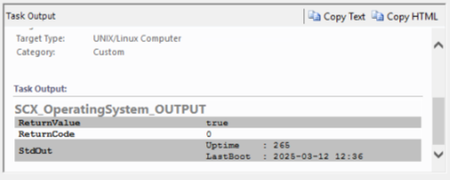

In SCOM, when handling the output from a script in an alert or expression, the entire StdOut is treated as a single text block. Since your script returns multiple lines, you need to parse and extract the specific values correctly.
https://lineman24.com
1. Modify the Script Output to Use XML Format:
Instead of returning raw text, format the output as XML. This makes it easier to parse in SCOM.
#!/bin/bash
uptime_seconds=$(cat /proc/uptime | cut -d'.' -f1)
last_boot=$(who -b | awk '{print $3, $4}')
# Output in XML format
echo "<Output>"
echo " <Uptime>$uptime_seconds</Uptime>"
echo " <LastBoot>$last_boot</LastBoot>"
echo "</Output>"
2. Use XPath in Expression and Alert Description:
To use Uptime in an expression:
$Data/Context//Output/Uptime$
To use LastBoot in an alert description:
$Data/Context//Output/LastBoot$
Why This Works:
XML allows you to structure the output properly.
SCOM can parse XML using XPath expressions.
You can then refer to Uptime in the condition and LastBoot in the alert.
Alternative (Using StdOut with Regex):
If you cannot modify the script, extract values using regex in SCOM instead:
Use a condition in the expression:
$Data/Context//*[local-name()="StdOut"][matches(., "Uptime : (\d+)")]
Extract the LastBoot for the alert:
$Data/Context//*[local-name()="StdOut"][matches(., "LastBoot : (.+)")]
https://lineman24.com
Using XML-formatted output is the most reliable way because SCOM's XPath parsing works best with structured data. Let me know if you need help adjusting it further!

Tried to make it with regex but got error:
Failed to replace parameter while creating the alert for monitor state change. It was possibly caused by incorrect XPATH and will result in monitor unload.

Workflow: UIGeneratedMonitorb35d936fbd0b42ba82be8e353d5b35ee
Instance: xxxxx
Instance ID: BE11936A-42E7-D48C-3AA0-1C64AEAB4368
Management Group: xxxx

Failing replacement: $Data/Context///*[local-name()="StdOut"][matches(., "LastBoot:(.+)")]$
$Data/Context///*[local-name()="StdOut"]$ does return StdOut data in alert description but cant point to specific property