Forum Discussion

New Posts with No Replies
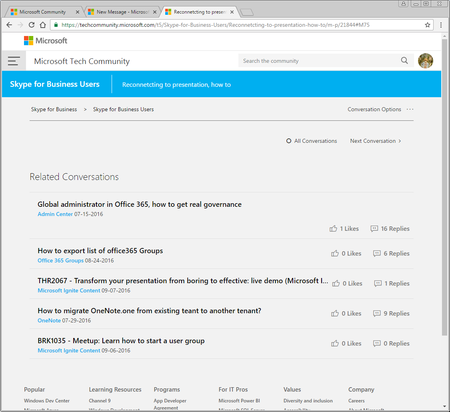

Tried in IE11 and same thing. Very weird. It wasn't always like this as I think it only started about a week ago and I just figured it was a fluke that would be fixed.

I'm seeing this too in IE11.
At first I thought maybe a post had been deleted and left a dead link, but I've just found the same thing with one of my posts that's been liked once and not deleted (at least I hope). :)
I was going to post a screenshot and then found this thread.
Very weird behaviour. Is anyone looking into this AnnaChu ?
-Sonia
- AnnaChuOct 19, 2016Former Employee
Hi Sonia Cuff I visited https://techcommunity.microsoft.com/t5/Skype-for-Business-Users/Reconnetcting-to-presentation-how-to/m-p/21844#M75 on IE11 and wasn't able to replicate the screenshot you were seeing.
I tried the link with compatibility settings turned on as well as off. Can you tell me if your compatibility settings were turned on? Are you still seeing this issue? Am I looking at the correct link?
- Sonia CuffOct 19, 2016Steel Contributor
Hi Anna,
That post is working now because it has one reply on it.
It only seems to happen to posts that don't have any replies yet. I can also reproduce in Google Chrome.
Try this link as this discussion has no replies yet: https://techcommunity.microsoft.com/t5/Office-365/Office-365-public-CDN-feature-does-not-appears/m-p/23453#M893
-Sonia
- AnnaChuOct 20, 2016Former Employee
Hi Sonia - we've made a change please let us know if you are seeing the full message now, for posts with 0 replies.
If not, please check your settings to see that your linear layout is set to the default setting 'Oldest First' - this means the posts will be displayed in chronological order. When displayed at 'Newest First', this seems to cause the issue.
Go to your settings and make sure you have it set to the default setting 'Oldest First'.
