Forum Discussion

peiyezhu
Nov 07, 2024Bronze Contributor
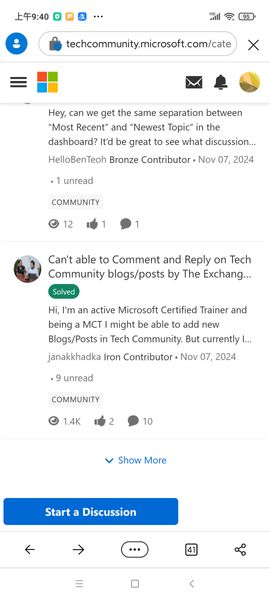
Issue:always back to first page
When I press show more,I will navigate to next page list. But after I press the one item (e.g. Home | Microsoft Community Hub ) to view all posts about this topic,I press back to the list...

peiyezhu
Nov 16, 2024Bronze Contributor
<script>
var page = 1; //分页码
function get_new_page(){
var xhr = new XMLHttpRequest();
xhr.timeout = 2000; // 超时时间,单位是毫秒
xhr.ontimeout = function (event) {
//alert("请求超时!");
	}
	var formData = new FormData();
	if(document.getElementById("search").value){

    xhr.open('GET', '?p=index/tnav_api_s&page='+page.toString()+'&s='+document.getElementById("search").value);
	}else{
    xhr.open('GET', '?p=index/tnav_api_s&page='+page.toString());

	}

	xhr.send();
    xhr.onreadystatechange = function(){
	if(xhr.readyState == 4 && xhr.status==200){
			if(xhr.responseText!=""){
			render(xhr.responseText);
			}
			page++;
			sessionStorage.setItem("nextPage",page);
}else{
//alert(xhr.statusText);
}
}

		}
function render(dt){
//alert(dt)
arr=JSON.parse(dt);
		var out=""
var i=0;
var length=arr.length;

for(;i<length;i++){

	//out=out+`<tr><td><div class="op"><a href="?p=Tools/detail&r=${arr[i]["rowid"]}">${arr[i]["rowid"]+arr[i]["名称"]}</a><span>${arr[i]["背景"]}</span><a href="?p=Tools/sqlEditor&tableName=${arr[i]["名称2"]}&find=${encodeURIComponent(arr[i]["查询语句2"])}">编辑</a><a href="./${arr[i]["rowid"]}.html">Run报表</a></div><div class=qry>${arr[i]["查询语句"]}</div>
	out=out+`<div class=box><div class="op"><a href="?p=Tools/detail&r=${arr[i]["rowid"]}">${arr[i]["rowid"]+arr[i]["名称"]}</a><span>${arr[i]["背景"]}</span><a href="?p=Tools/sqlEditor&tableName=${arr[i]["名称2"]}&find=${encodeURIComponent(arr[i]["查询语句2"])}">编辑</a><a href="./${arr[i]["rowid"]}.html" target="_blank">Run报表</a></div><div class=qry>${arr[i]["查询语句"]}</div>

		<div>${arr[i]["描述"]}</div>
		<div><img src='${arr[i]["图片链接"]}'></div></div>`;
}
var e=document.querySelector(".tbody");

e.insertAdjacentHTML("beforeEnd", out );
	sessionStorage.setItem("cache_str",e.innerHTML);
}
function first_load(){
		var cache_str=sessionStorage.getItem("cache_str");
		if(cache_str){
//从缓存恢复

var e=document.querySelector(".tbody");
	page=sessionStorage.getItem("nextPage");
e.innerHTML=cache_str;
	//	alert(page);
			}else{

	get_new_page();
			}
}

   // 获取当前滚动条的位置
   function getScrollTop() {
       var scrollTop = 0;
       if (document.documentElement && document.documentElement.scrollTop) {
           scrollTop = document.documentElement.scrollTop;
       } else if (document.body) {
           scrollTop = document.body.scrollTop;
       }
       return scrollTop;
   }

   // 获取当前可视范围的高度
   function getClientHeight() {
       var clientHeight = 0;
       if (document.body.clientHeight && document.documentElement.clientHeight) {
           clientHeight = Math.min(document.body.clientHeight, document.documentElement.clientHeight);
       }
       else {
           clientHeight = Math.max(document.body.clientHeight, document.documentElement.clientHeight);
       }
       return clientHeight;
   }

   // 获取文档完整的高度
   function getScrollHeight() {
       return Math.max(document.body.scrollHeight, document.documentElement.scrollHeight);
   }

   var _text = document.querySelector('.refreshText'),
    // _container = document.getElementById('ul');
     _container = document.getElementById('tbodyid');

   // 节流函数
   var throttle = function(method, context){
     clearTimeout(method.tId);
     method.tId = setTimeout(function(){
       method.call(context);
     }, 300);
   }

   function fetchData() {
//       setTimeout(function() {
//           _container.insertAdjacentHTML('beforeend', '<li>new add...iii</li>');
			get_new_page();

		   _text.innerText = '上拉加载';
  //     }, 1000);
   }

   window.onscroll = function() {
     if (getScrollTop() + getClientHeight() < getScrollHeight()) {
         _text.innerText = '加载中...';
         throttle(fetchData);
     }
   };

window.addEventListener('load',first_load, false);

</script>
<script>
	function do_search(){
			sessionStorage.removeItem("cache_str")
			sessionStorage.removeItem("nextPage")
			page=1
		document.querySelector(".tbody").innerHTML=""
	first_load();

return false;

		}
</script>
Possible solution by above java script.
- peiyezhuNov 16, 2024Bronze Contributor
Load next page by scroll without show more button.
And back to original list position rather than always first.page.