Forum Discussion

Jason4
Jul 03, 2026Copper Contributor
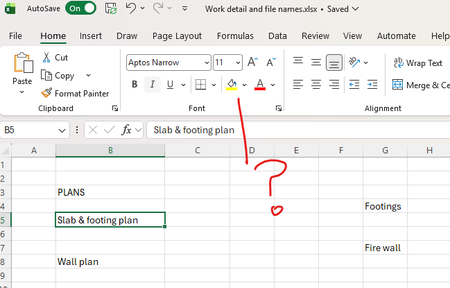
Excel command icon to change from upper or lower case text
Where is the command icon for changing text from upper or lower case. There is one in word, but none in excel that I can find. I though this would have been a standard feature. After the 40 years o...

Marcos A. Amarante
Jul 07, 2026Copper Contributor
I agree, this feature would be very useful and would save a lot of time. Until Microsoft adds it, I usually rely on the UPPER(), LOWER(), and PROPER() formulas, then copy and paste the results back as values. Another workaround is using a simple VBA macro or Office Script if you need to change the case frequently. Hopefully this becomes a built-in command in Excel, just like it is in Word.
Office Script: Change Text Case for Selected Cells
function main(workbook: ExcelScript.Workbook) {
  const range = workbook.getSelectedRange();

  // Choose one option:
  // "UPPER" = UPPERCASE
  // "LOWER" = lowercase
  // "PROPER" = Proper Case
  const mode = "UPPER";

  const values = range.getValues();

  const newValues = values.map(row =>
    row.map(cell => {
      if (typeof cell !== "string") return cell;

      if (mode === "UPPER") return cell.toUpperCase();
      if (mode === "LOWER") return cell.toLowerCase();
      if (mode === "PROPER") {
        return cell
          .toLowerCase()
          .replace(/\b\w/g, char => char.toUpperCase());
      }

      return cell;
    })
  );

  range.setValues(newValues);
}
How to deploy
- Open Excel for the Web.
- Go to the Automate tab.
- Click New Script.
- Delete the default code.
- Paste the script above.
- Set the desired conversion mode by changing:
const mode = "UPPER";
Available options:
- "UPPER" → Converts text to uppercase.
- "LOWER" → Converts text to lowercase.
- "PROPER" → Capitalizes the first letter of each word.
- Save the script (for example, Change Text Case).
- Select the cells you want to modify.
- Click Run.
The selected cells will be updated in place with the chosen text case.